
1. Isingeniso
This manual provides detailed instructions for the installation, operation, and maintenance of your Antec P50 Window R Mid-Tower PC Case. The Antec P50 Window R is designed for silent computing with optimized airflow and support for Micro ATX and Mini-ITX motherboards. It features a dual-chamber structure, liquid cooling support, and multiple drive bays for a versatile build.
Sicela ufunde le ncwadi ngokucophelela ngaphambi kokuqala ukufaka ukuze uqinisekise ukusethwa okufanele nokwandisa ukusebenza kanye nobude besikhathi sesistimu yakho.
2. Ukusetha nokufakwa
2.1 Ukuqaqa kanye Nokuhlola
Carefully remove the PC case from its packaging. Inspect the case for any signs of damage that may have occurred during shipping. Retain the packaging for future transport or warranty claims.
2.2 Ukususa Amaphaneli Aseceleni
Locate and unscrew the thumbscrews on the rear of the case. Slide the side panels backward and lift them off to access the interior.

Isithombe: Engela view of the Antec P50 Window R PC Case, showing its compact mid-tower design and front panel.
2.3 Ukufakwa Kwebhodi Yomama
- Faka isihlangu se-I/O ekuvuleni kwangemuva kwekesi.
- Ensure the motherboard standoffs are correctly aligned for your Micro ATX or Mini-ITX motherboard.
- Carefully place the motherboard onto the standoffs, aligning the screw holes.
- Vikela i-motherboard ngezikulufo ezinikeziwe.

Isithombe: Ingaphakathi view of the Antec P50 Window R PC Case, highlighting the motherboard tray and cable routing options.
2.4 Ukufakwa Kokunikezwa Kwamandla
The P50 Window R supports bottom-mount power supplies. Install your power supply into the designated compartment at the bottom rear of the case and secure it with screws.
2.5 Ukufakwa Kwedrayivu
The case features 6 drive bays:
- One 5.25" external drive bay (for optical drives).
- Three 3.5" HDD drive bays.
- Two 2.5" SSD drive bays.
Follow the case's internal guides for tool-less or screw-based installation of your storage devices.

Isithombe: Ingaphakathi view of the Antec P50 Window R PC Case, showing the rear of the motherboard tray with cable management space and drive bay locations.
2.6 Ukufakwa Kwekhadi Lokukhulisa
The case provides 4 expansion slots. Remove the slot covers as needed and install your graphics card or other expansion cards, securing them with screws.
2.7 Ukufakwa kwefeni nerediyetha
The P50 Window R comes with pre-installed fans: two 120mm fans and one 80mm fan at the front, and one 80mm fan at the rear. It supports additional 80mm/120mm fan mounts and a 240mm radiator in the front or top for liquid cooling.
- For liquid cooling, install the 240mm radiator in the designated front or top mounting points.
- Ensure fans are oriented correctly for optimal airflow (intake at front, exhaust at rear/top).
2.8 Ukuphathwa Kwekhebula
Sebenzisa iziqeshana zokuqondisa ikhebula kanye nezindawo zokubopha ngemuva kwethreyi lebhodi lomama ukuphatha izintambo. Lokhu kuthuthukisa ukuhamba komoya kanye nobuhle.
2.9 Iphaneli Engaphambili Exhumanisayo I/O
Connect the front panel cables (USB 3.0, USB 2.0, HD Audio, Power Switch, Reset Switch, Power LED, HDD LED) to the corresponding headers on your motherboard. Refer to your motherboard manual for header locations.
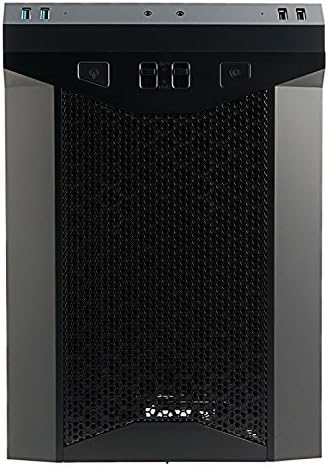
Isithombe: Ngaphambili view of the Antec P50 Window R PC Case, showing the mesh intake and front panel controls.
3. Ukusebenza
3.1 Front Panel Controls and Ports
Iphaneli engaphambili inikeza ukufinyelela okulula ku:
- Inkinobho yamandla: To turn the system on or off.
- Setha kabusha Inkinobho: Ukuze uqale kabusha uhlelo.
- Izimbobo ze-USB 3.0 (x2): Ngokudlulisa idatha ngesivinini esikhulu.
- Izimbobo ze-USB 2.0 (x2): Kumadivayisi e-USB ajwayelekile.
- Ama-Audio Jacks: For headphones and microphone.
- Izilawuli zabalandeli: Two fan control switches are available to adjust fan speeds for optimal balance between cooling and noise.
3.2 Ukugeleza Komoya Nokupholisa
The P50 Window R features a dual-chamber structure designed for direct airflow, separating heat-generating components. The pre-installed fans and additional mounting options ensure efficient cooling for your system.
4. Isondlo
4.1 Ukuhlanza Izihlungi Zothuli
Regularly clean the dust filters to maintain optimal airflow and prevent dust buildup inside the case. Dust filters are typically located at the front, top, and bottom (for the power supply intake). Gently remove them and clean with compressed air or rinse with water (ensure they are completely dry before reinstallation).
4.2 Ukuhlanza Okujwayelekile
Sebenzisa okuthambile, damp cloth to clean the exterior surfaces of the case. Avoid abrasive cleaners. For interior cleaning, use compressed air to remove dust from components and internal surfaces.
5. Ukuxazulula izinkinga
5.1 Uhlelo alusebenzi
- Ensure all power cables (24-pin ATX, 8-pin CPU, GPU power) are securely connected to the motherboard and components.
- Qinisekisa ukuthi iswishi yokunikezela ugesi isesimweni 'SOVULIWE'.
- Check that the front panel power switch cable is correctly connected to the motherboard header.
5.2 Umsindo Oweqisayo
- Check if any cables are obstructing fan blades.
- Ensure all fans are securely mounted.
- Utilize the front panel fan controls to adjust fan speeds.
5.3 Poor Cooling Performance
- Clean all dust filters to ensure unrestricted airflow.
- Verify that fans are oriented correctly (intake/exhaust).
- Ensure proper cable management to avoid blocking airflow.
5.4 Front Panel USB/Audio Ports Not Working
- Confirm that the front panel USB and audio cables are correctly connected to the corresponding headers on your motherboard.
6. Imininingwane
| Isici | Imininingwane |
|---|---|
| Igama Lemodeli | P50 WINDOW R |
| Uhlobo Lwekesi | Mid Mid |
| Ukuhambisana kwe-Motherboard | Micro ATX, Mini-ITX |
| Ubukhulu (D x W x H) | 355mm x 260mm x 355mm (13.98"D x 355"H) |
| Okubalulekile | I-Polycarbonate (PC) |
| Drives Bays | 1 x 5.25" (external), 3 x 3.5" HDD, 2 x 2.5" SSD |
| Ukunwetshwa Slots | 4 |
| Izimbobo zangaphambili ze-I / O | 2 x USB 3.0, 2 x USB 2.0, Audio In/Out, 2 x Fan Controls |
| Abalandeli abafakwe ngaphambilini | Front: 2 x 120mm, 1 x 80mm; Rear: 1 x 80mm |
| Ukwesekwa kokuphuza kwamanzi | 240mm radiator (front/top) |
| Max Video Card Size | 300 mm |
| I-Max CPU Cooler Height | 130 mm |
| Ukufakwa Kwezinto Zamandla | Intaba Ephansi |
| Isisindo sento | 11.7 Amakhilogremu |
7. Ulwazi Lwewaranti
The Antec P50 Window R PC Case comes with a Limited Warranty period (parts): 1 year. Please retain your proof of purchase for warranty claims. For specific terms and conditions, refer to the official Antec webisayithi noma uxhumane nokwesekwa kwamakhasimende.
8. Ukusekela
For further assistance, technical support, or to inquire about replacement parts, please visit the official Antec website or contact their customer service department. You can often find FAQs, driver downloads, and additional resources on the manufacturer's support pages.
Antec Official Webindawo: www.antec.com