
1. Isingeniso
This manual provides detailed instructions for the installation, operation, and maintenance of your SpeaKa Professional DL-1117 In-Wall/Ceiling Speaker. Please read this manual thoroughly before installation and use to ensure proper function and safety. Keep this manual for future reference.
2. Umkhiqizo Uphelileview
The SpeaKa Professional DL-1117 is a high-quality in-wall/ceiling speaker designed for various audio applications in both residential and industrial environments. Its robust metallic construction ensures durability and reliable performance.

Umfanekiso 2.1: Ngaphambili view of the SpeaKa Professional DL-1117 In-Wall/Ceiling Speaker. This image shows the speaker's front grille and mounting frame.
Izici Eziyinhloko:
- Ideal for wall and ceiling mounting.
- Suitable for industrial and residential spaces.
- Solid metallic construction for enhanced durability.
3. Imininingwane
| Ukucaciswa | Inani |
|---|---|
| Ibhrendi | SpeaKa Professional |
| Igama Lemodeli | I-DL-1117 |
| Inombolo Yemodeli Yento | SP-1207908 |
| Uhlobo lwesipika | In-Wall/Ceiling Speaker |
| Usayizi wesipika | 8 Inches (77mm INWALL SPEAKER as per label) |
| Impedance | 8 ohm |
| Power (Nominal) | 15 Watts |
| Amandla Okukhipha Isipikha aphezulu | 25 Watts |
| Impendulo Yemvamisa | 90Hz - 17,000Hz (as per label) |
| Uhlobo Lokukhweza | Ceiling Mount (also suitable for wall mount) |
| Ubukhulu bomkhiqizo (L x W x H) | 11 x 11 x 7 cm |
| Isisindo sento | 520 amagremu |
| Umbala | Mnyama |
| Inani lamayunithi | 1 iyunithi |
| Ukusetshenziswa Okunconyiwe | For computer (audio output), general audio systems |
| Amadivayisi Ahambisanayo | Desktop computer, Laptop (via amplifier/receiver) |

Umfanekiso 3.1: Dimensional drawing of the SpeaKa Professional DL-1117 speaker. This diagram illustrates the speaker's diameter (Ø100mm), depth (49mm), and cutout dimensions (Ø74mm, Ø81mm).
Umfanekiso 3.2: Emuva view of the SpeaKa Professional DL-1117 speaker, showing the product label with model number DL-1117BK8, frequency response, power rating, and impedance.
4. Iziyalezo Zokuphepha
Sicela uqaphele lezi zinyathelo zokuphepha ezilandelayo ukuze uvimbele ukulimala noma ukulimala komkhiqizo:
- Ukuphepha Kagesi: Ensure all power to the audio system is disconnected before making any connections or performing installation. Incorrect wiring can cause damage to the speaker or ampokokuphila.
- Ukufakwa: Installation should be performed by a qualified professional if you are unsure about electrical wiring or structural integrity. Ensure the mounting surface (wall or ceiling) can safely support the weight of the speaker.
- Imvelo: Do not expose the speaker to excessive moisture, extreme temperatures, or direct sunlight.
- Ukuhlanza: Sebenzisa indwangu ethambile neyomile ekuhlanzeni. Ungasebenzisi izihlanzi eziwuketshezi noma ama-aerosols.
- Ukuqaqa: Do not attempt to disassemble or modify the speaker. This will void the warranty and may cause damage or injury.
5. Ukusetha nokufakwa
Follow these steps for proper installation of your in-wall/ceiling speaker:
5.1 Amathuluzi adingekayo
- Ukubhoboza
- Hole saw (matching cutout diameter, approx. Ø74-81mm)
- Isikulufi
- Ama-stripper ezintambo
- Speaker wire (appropriate gauge for your amplifier and cable length)
5.2 Indawo Yokubeka
Choose a suitable location in your wall or ceiling. Ensure there are no electrical wires, plumbing, or structural elements behind the chosen area. Use a stud finder if necessary.
5.3 Ukusika Ukuvula
- Carefully mark the desired cutout diameter on the wall or ceiling. Refer to the dimensions in Figure 3.1.
- Using a hole saw, carefully cut the opening.
Izintambo
- Run speaker wire from your amplifier/receiver to the cutout opening.
- Strip approximately 1/2 inch (12mm) of insulation from the ends of the speaker wire.
- Connect the speaker wires to the terminals on the back of the DL-1117 speaker. Ensure correct polarity (+ to + and - to -) from the amplifier to the speaker. The terminals are typically screw-type or spring-loaded.
5.5 Installing the Speaker
- Carefully insert the speaker into the cutout opening.
- Secure the speaker using the integrated mounting clips or screws, if applicable. For this model, the design suggests it is inserted and then secured from the front.

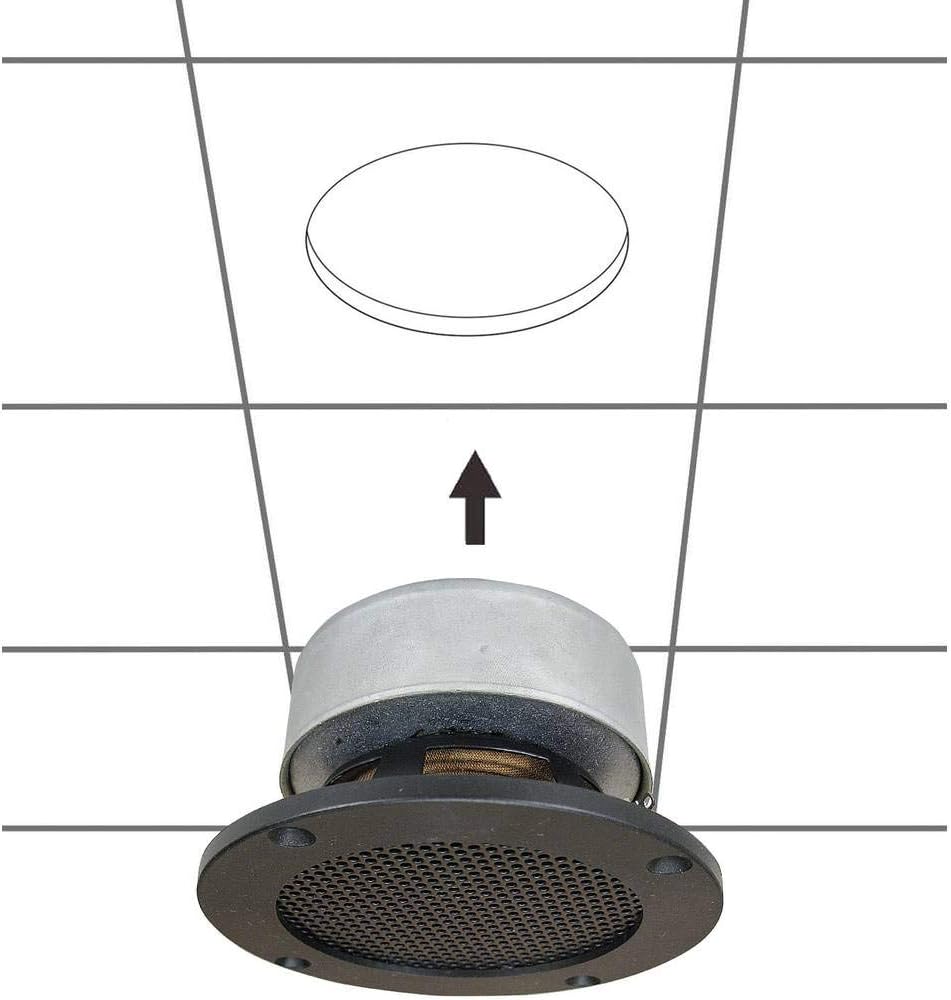
Umfanekiso 5.1: Diagram illustrating the installation process of the SpeaKa Professional DL-1117 speaker into a ceiling opening. The speaker is inserted from below into the pre-cut hole.
6. Iziqondiso Zokusebenza
Once the speaker is correctly installed and wired to your amplifier or receiver:
- Qinisekisa ukuthi konke ukuxhumana kuvikelekile.
- Vula eyakho ampisilayishi/umamukeli.
- Start playing audio through your connected source.
- Lungisa ivolumu kweyakho amplifier/receiver to a comfortable listening level. Avoid excessively high volumes that could distort the sound or damage the speaker.
7. Isondlo
The SpeaKa Professional DL-1117 speaker requires minimal maintenance:
- Ukuhlanza: Periodically wipe the speaker grille and frame with a soft, dry cloth to remove dust. Do not use abrasive cleaners or solvents.
- Ukuhlola: Occasionally check the speaker for any visible damage or loose connections.
8. Ukuxazulula izinkinga
Uma uhlangabezana nezinkinga ngesikhulumi sakho, bheka izinkinga nezixazululo ezilandelayo ezivamile:
| Inkinga | Imbangela Engenzeka | Isixazululo |
|---|---|---|
| Awukho umsindo ovela esipikheni | Izintambo ezixegayo noma ezingalungile Amplifier/receiver off or muted Source device not playing audio | Check all speaker wire connections for proper polarity and tightness. Qinisekisa amplifier/receiver is on and not muted, and volume is up. Qinisekisa ukuthi umsindo uyadlala kusuka kudivayisi yomthombo. |
| Umsindo ohlanekezelwe | Ivolumu iphezulu kakhulu Umthombo womsindo wekhwalithi embi Damaged speaker wire | Yehlisa ivolumu ku- ampisilayishi/umamukeli. Try a different audio source to rule out source issues. Inspect speaker wires for fraying or damage and replace if necessary. |
| Umsindo ophakathi | Ukuxhumana okuxekethile Iphutha ampisiteshi se-lifier | Check and secure all speaker wire connections. Test the speaker with a different amplifier channel or a known working ampokokuphila. |
If the problem persists after trying these solutions, please contact SpeaKa Professional customer support.
9. Iwaranti kanye Nokusekela
For warranty information and customer support, please refer to the documentation provided with your purchase or visit the official SpeaKa Professional webindawo. Gcina ubufakazi bakho bokuthenga ngezimangalo zewaranti.
Umkhiqizi: SpeaKa Professional
ASIN: B00CS2V1AQ