
1. Isingeniso
This manual provides essential information for the proper setup, operation, and maintenance of your Dual DAB 2 A DAB/DAB+ Radio Adapter. Please read these instructions carefully before using the device to ensure optimal performance and safety. The Dual DAB 2 A allows you to upgrade your existing stereo system with digital radio reception (DAB/DAB+) and traditional FM radio.
2. Ulwazi Lokuphepha
- Umthombo wamandla: Sebenzisa kuphela i-adaptha yamandla eshiwo. Qinisekisa ivolumutage ihambisana nezidingo zedivayisi.
- Amanzi Nomswakama: Ungabeki idivayisi emvuleni, emswakama, noma emanzini avuzayo/achithekayo. Ungabeki izinto ezigcwele uketshezi, njengezitsha, kudivayisi.
- Ukungenisa umoya: Qinisekisa ukuthi kungena umoya owanele. Ungavimbi izimbobo zokungenisa umoya.
- Ukushisa: Gcina idivayisi kude nemithombo yokushisa efana nama-radiator, ama-heat registers, izitofu, noma ezinye izinto (kufaka phakathi ampama-lifiers) akhiqiza ukushisa.
- Ukuhlanza: Unplug the device from the power outlet before cleaning. Use a soft, dry cloth. Do not use liquid cleaners or aerosol cleaners.
- Ukusevisa: Ungazami ukuletha lo mkhiqizo ngokwakho. Dlulisela konke ukwesekwa kubasebenzi bensizakalo abafanelekayo.
3. Okuqukethwe Kwephakheji
Sicela uhlole ukuthi zonke izinto ezibalwe ngezansi zifakiwe kuphakheji yakho:
- Dual DAB 2 A Radio Adapter
- I-adaptha yamandla
- External Antenna (wire with connector)
- Isilawuli kude
- Incwadi Yomsebenzisi (le dokhumenti)
4. Umkhiqizo Uphelileview
4.1 Iphaneli langaphambili
The front panel features the main display and controls for operating the device.

Isithombe 4.1: Ngaphambili view of the Dual DAB 2 A radio adapter. The display shows the current time (14:28) and the selected station ("Senderliste #Galaxy"). The "DAB+" logo is visible at the top left, and "Dual" is printed at the bottom center.

Isithombe 4.2: I-engeli ngaphambili view of the Dual DAB 2 A, providing a clearer look at the illuminated multi-line LCD display and the device's compact design.
4.2 Iphaneli Yangemuva Nokuxhumeka
The rear panel contains all necessary connection ports for power, antenna, and audio output.

Isithombe 4.3: Ngemuva view of the Dual DAB 2 A. From left to right, the ports are: LINE OUT (3.5mm audio jack), I-DC 6.0V=0.5A (power input), I-ANTENNA (coaxial connector for external antenna), and AMANDLA inkinobho.

Isithombe 4.4: Side view of the Dual DAB 2 A, illustrating its compact and slightly curved profile.

Isithombe 4.5: Uhlangothi olugobile view showing the rear connections, including the Line Out, DC power input, and antenna port.
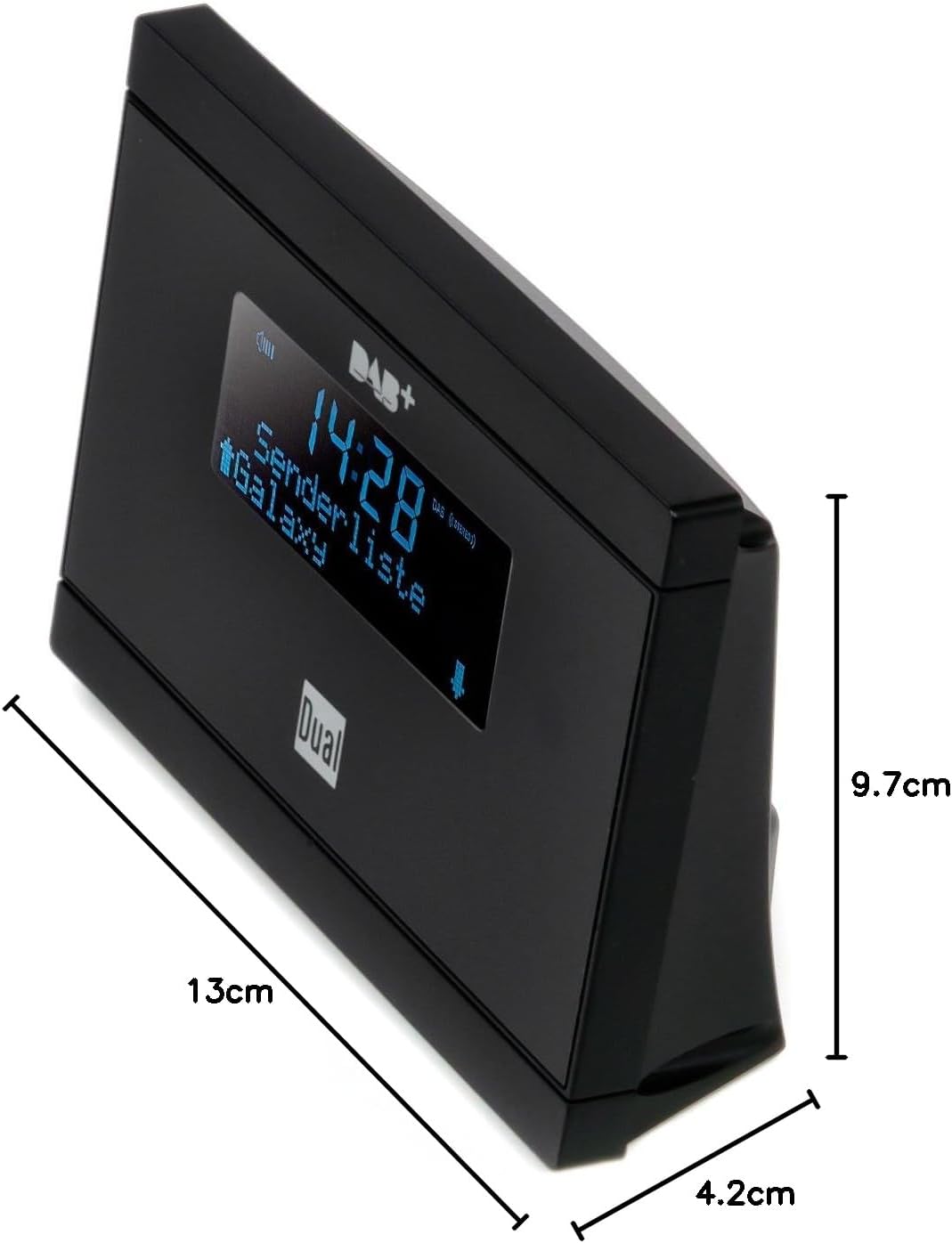
Isithombe 4.6: Dimensions of the Dual DAB 2 A: 13 cm (length), 4.2 cm (width), and 9.7 cm (height).
5. Setha
5.1 Ukuxhuma uthi
- Thola i- I-ANTENNA port on the rear of the DAB 2 A.
- Connect the supplied external wire antenna to this port.
- For optimal reception, position the antenna away from other electronic devices and metallic objects. You may also connect a commercially available external antenna for improved signal quality.
5.2 Connecting to your Stereo System
- Thola i- LINE OUT (3.5mm jack) on the rear of the DAB 2 A.
- Connect an audio cable (not supplied) from the LINE OUT of the DAB 2 A to an available audio input (e.g., AUX IN, LINE IN) on your existing stereo system or audio device.
5.3 Ukuxhuma Amandla
- Xhuma i-adaptha yamandla enikeziwe ku- I-DC 6.0V=0.5A port on the rear of the DAB 2 A.
- Xhuma i-adaptha yamandla endaweni efanele yodonga.
6. Iziqondiso Zokusebenza
6.1 Ukuvula / Ukuvula
Cindezela inkinobho AMANDLA button on the rear of the device or on the remote control to turn the unit on or off.
6.2 Initial Scan (DAB/DAB+)
Upon first power-on, the device will automatically perform a scan for available DAB/DAB+ stations. This process may take a few minutes. Once complete, the first available station will begin playing.
6.3 Switching Between DAB/DAB+ and FM
Sebenzisa i- IMODE button on the remote control or the device (if available) to switch between DAB/DAB+ and FM radio modes.
6.4 Tuning and Station Selection
- I-DAB/DAB+: Sebenzisa i- PHEZULU/PHANSI arrow buttons on the remote control or device to navigate through the list of available digital stations.
- Ukhozi FM: Kumodi ye-FM, sebenzisa i PHEZULU/PHANSI arrow buttons to manually tune frequencies or initiate an automatic scan for the next available station.
6.5 Storing and Recalling Presets
The DAB 2 A allows you to store up to 20 favorite stations (DAB/DAB+ and FM combined).
- Okokugcina: Vula isiteshi osifunayo. Cindezela bese ubamba PRESET button (or similar, refer to remote control layout) until the display shows a preset number. Use the arrow buttons to select a preset number (1-20) and confirm.
- Ukukhumbula: Cindezela inkinobho PRESET button briefly, then use the arrow buttons to select the desired preset station.
6.6 Clock, Alarm, and Sleep Functions
The device features a clock, alarm, and sleep timer. Refer to the detailed instructions in the full manual for setting these functions. The alarm can be set to wake you with DAB, FM, or a buzzer sound.
7. Isondlo
- Ukuhlanza: Always unplug the device before cleaning. Use a soft, dry, lint-free cloth to wipe the surfaces. Do not use abrasive cleaners, waxes, or solvents.
- Isitoreji: If not in use for an extended period, unplug the device and store it in a cool, dry place.
8. Ukuxazulula izinkinga
| Inkinga | Imbangela Engenzeka | Isixazululo |
|---|---|---|
| Awekho amandla | I-adaptha yamandla ayixhunyiwe noma i-outlet enephutha. | Qinisekisa ukuthi i-adaptha yamandla ixhunywe ngokuphephile kudivayisi kanye nendawo yokukhipha ugesi esebenzayo. |
| Awukho umsindo | Audio cable not connected, incorrect input selected on stereo, or volume too low. | Check audio cable connection. Select the correct input on your stereo system. Increase volume on both the DAB 2 A and your stereo. |
| Poor DAB/DAB+ reception or no stations found | Weak signal, antenna not properly connected or positioned. | Ensure the antenna is securely connected and positioned for optimal reception. Try repositioning the antenna. Consider using a higher-gain external antenna. Perform a full scan for stations. |
| Ukwemukelwa kahle kwe-FM | Weak signal, antenna not properly connected or positioned. | Extend and reposition the wire antenna. Try a different antenna if available. |
| Isilawuli kude asisebenzi | Batteries are dead or incorrectly inserted, or line of sight is blocked. | Replace batteries with new ones, ensuring correct polarity. Remove any obstructions between the remote and the device. |
9. Imininingwane
| Isici | Imininingwane |
|---|---|
| Ibhrendi | Okukabili |
| Inombolo Yemodeli | DAB 2 A |
| Umbala | Mnyama |
| Ubuchwepheshe bokuxhumana | Auxiliary (3.5mm Line Out) |
| Izici ezikhethekile | DAB/DAB+ Radio, FM Tuner, Clock, Alarm, Sleep Function |
| Amadivayisi Ahambisanayo | Devices with 3.5 mm audio connector |
| Ubukhulu bomkhiqizo (L x W x H) | 13 cm x 4.2 cm x 9.7 cm |
| Ubuchwepheshe Bokushuna | I-FM, i-DAB, i-DAB+ |
| Umthombo wamandla | Electric Cable (DC 6.0V=0.5A) |
| Amabhendi Omsakazo Asekelwayo | I-FM, i-DAB, i-DAB+ |
| Isisindo sento | 200 amagremu |
10. Iwaranti kanye Nokusekela
For warranty information and technical support, please refer to the documentation provided with your purchase or contact Dual customer service. Keep your proof of purchase for any warranty claims.