
1. Isingeniso
The D-Link GO-SW-5G is a 5-Port Unmanaged Gigabit Desktop Switch designed for home and small office environments. This device provides a simple and cost-effective solution to expand your network connectivity, offering high-speed Gigabit Ethernet ports for reliable data transfer. It incorporates D-Link's Green Technology for energy efficiency, reduced heat generation, and extended product lifespan.
This switch is a plug-and-play device, requiring no complex configuration or software installation, making it easy to integrate into an existing network.
2. Okuqukethwe Kwephakheji
Sicela uqinisekise ukuthi zonke izinto ezibalwe ngezansi zifakiwe kuphakheji yakho:
- D-Link GO-SW-5G 5-Port Gigabit Desktop Switch
- I-adaptha yamandla
- Umhlahlandlela Wokufaka Ngokushesha
If any items are missing or damaged, please contact your retailer for assistance.
3. Sethaphu Imiyalelo
The D-Link GO-SW-5G switch is designed for easy plug-and-play installation. Follow these steps to set up your device:
3.1. Xhuma I-adaptha Yamandla
- Locate the power input port on the side of the D-Link GO-SW-5G switch.
- Connect the provided power adapter to this port.
- Xhuma olunye uhlangothi lwe-adaptha yamandla endaweni yokukhipha ugesi ejwayelekile.
- The power LED on the front of the switch will illuminate, indicating that the device is receiving power.

Umfanekiso 1: Side view of the D-Link GO-SW-5G switch with the power input port.
3.2. Xhuma Kunethiwekhi Yakho
- Using a standard Ethernet cable (RJ45), connect one end to an available LAN port on your router (not your modem).
- Connect the other end of this Ethernet cable to any of the five available ports on the back of the D-Link GO-SW-5G switch.
- The corresponding LED on the front of the switch will light up, indicating an active connection.
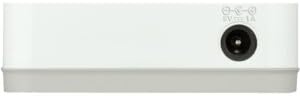
Umfanekiso 2: Ngemuva view of the D-Link GO-SW-5G switch with five Ethernet ports.
3.3. Connect Network Devices
- Connect your network devices (e.g., computers, gaming consoles, network printers, smart TVs) to the remaining available Ethernet ports on the D-Link GO-SW-5G switch using Ethernet cables.
- Each connected device will have its corresponding LED on the front of the switch illuminate, confirming a successful connection.

Umfanekiso 3: Ngaphambili view of the D-Link GO-SW-5G switch showing active port LEDs.
4. Iziqondiso Zokusebenza
The D-Link GO-SW-5G is an unmanaged switch, meaning it operates automatically without requiring user configuration. Once connected as described in the Setup section, it will begin forwarding network traffic between connected devices.
- Automatic Negotiation: The switch automatically detects the network speed (10/100/1000 Mbps) and duplex mode (half/full) of connected devices and adjusts accordingly.
- Auto MDI/MDIX: All ports support automatic MDI/MDIX crossover, eliminating the need for crossover cables when connecting to other switches or hubs.
- Izinkomba ze-LED: Each port has an LED indicator on the front panel. A lit LED indicates an active link, and blinking indicates network activity.
5. Isondlo
To ensure optimal performance and longevity of your D-Link GO-SW-5G switch, consider the following maintenance guidelines:
- Ukubekwa: Place the switch in a cool, dry location away from direct sunlight, heat sources, and excessive moisture. Ensure adequate ventilation around the device.
- Ukuhlanza: Use a soft, dry cloth to clean the exterior of the switch. Avoid using liquid or aerosol cleaners, as they may damage the device.
- Ukuphathwa Kwekhebula: Keep Ethernet cables neatly organized to prevent tangles and accidental disconnections.
- Umjikelezo Wamandla: If you experience network issues, a simple power cycle (unplugging the power adapter for 10 seconds and then plugging it back in) can often resolve minor problems.
6. Ukuxazulula izinkinga
If you encounter issues with your D-Link GO-SW-5G switch, refer to the following common troubleshooting steps:
- Ayikho i-LED yamandla:
- Qinisekisa ukuthi i-adaptha yamandla ixhunywe ngokuvikelekile kukho kokubili iswishi kanye ne-outlet kagesi esebenzayo.
- Qinisekisa ukuthi i-outlet kagesi iyasebenza ngokuxhuma enye idivayisi.
- No Link/Activity LED for a Connected Device:
- Check that the Ethernet cable is securely plugged into both the switch port and the network device.
- Zama ikhebuli ye-Ethernet ehlukile ukuze ukhiphe ikhebuli engalungile.
- Qinisekisa ukuthi idivayisi exhunyiwe ivuliwe futhi i-adaptha yayo yenethiwekhi isebenza kahle.
- Zama ukuxhuma idivayisi endaweni ehlukile ekushintsheni.
- Isivinini Senethiwekhi Esinensayo:
- Verify that all connected devices and cables support Gigabit Ethernet (1000 Mbps) for optimal performance. The switch will operate at the lowest common speed.
- Ensure your router and internet service provider (ISP) plan support the desired speeds.
- Perform a power cycle on the switch and your router.
- Ukuxhumana Kwesikhashana:
- Hlola ukuxhumeka kwekhebula okuxekethile.
- Ensure the switch is not overheating; provide adequate ventilation.
- Test with different Ethernet cables.
7. Imininingwane
| Ibhrendi | I-D-Link |
| Inombolo Yemodeli | GO-SW-5G/B |
| Inani lamachweba | 5 |
| Shintsha Uhlobo | Akuphethwe |
| Isilinganiso Sokudluliswa Kwedatha | 1 Gigabits ngesekhondi (10/100/1000 Mbps) |
| Isixhumi esibonakalayo | RJ45 |
| Umbala | Emhlophe |
| Isisindo sento | 0.22 Amakhilogremu |
| Voltage | Ama-Volts angama-100-240 |
| Amadivayisi Ahambisanayo | PC, Mac, and other Ethernet-enabled devices |
| Ishintsha Indwangu | 10 Gbps |
| I-UPC | 790069365669 |
8. Iwaranti kanye Nokusekela
Isiqinisekiso Esinomkhawulo: The D-Link GO-SW-5G switch comes with a 3-year limited warranty. For detailed terms and conditions, please refer to the warranty information included in your package or visit the official D-Link webindawo.
Ukusekela kwezobuchwepheshe: For technical assistance, product registration, or to download the latest firmware and documentation, please visit the Ukusekelwa kwe-D-Link Webindawo or contact D-Link customer service.