
Isingeniso
The OSD Audio AB12 is an in-wall speaker selector A/B switch designed to manage audio output between two amplifiers and one pair of speakers, or one amplifier and two pairs of speakers. This device allows for convenient selection of audio sources or destinations within a dedicated audio zone. It is rated for up to 100 watts per channel and features a push-button control for easy operation.
Izinyathelo Zokuphepha
- Njalo nqamula amandla ku- amplifier and any connected audio equipment before installation or wiring.
- Ensure all wiring connections are secure to prevent short circuits or damage to equipment.
- Do not exceed the maximum power rating of 100 watts per channel.
- Consult a qualified electrician if you are unsure about any electrical wiring procedures.
Ukusetha nokufaka
Amathuluzi Ayadingeka
- I-Screwdriver (ikhanda likaPhillips)
- Ama-stripper ezintambo
- Iteyipu kagesi (uma uthanda)
- Standard single-gang junction box (if not already installed)
Imiyalo yezintambo
The AB12 features removable, solderless terminals for easy wiring. It accepts speaker wire up to 14 gauge. For optimal sound quality, 14-16 gauge wire is recommended.
- Lungisa Izintambo: Strip approximately 1/4 to 1/2 inch of insulation from the ends of your speaker wires. Twist the bare wire strands tightly.
- Khomba Amatheminali: The AB12 has clearly labeled terminals for 'OUTPUT' (to speakers) and 'AMP A INPUT' / 'AMP B INPUT' (from amplifiers). Each input/output has terminals for Left (+) and (-), and Right (+) and (-).
- Xhuma Izipikha: Connect your speaker wires to the 'OUTPUT' terminals. Ensure correct polarity (positive to positive, negative to negative).
- Xhuma Ampabaphilayo: Connect the speaker output wires from your primary amplifier to the 'AMP A INPUT' terminals. Connect the speaker output wires from your secondary amplifier (if used) to the 'AMP B INPUT' terminals. Maintain correct polarity.
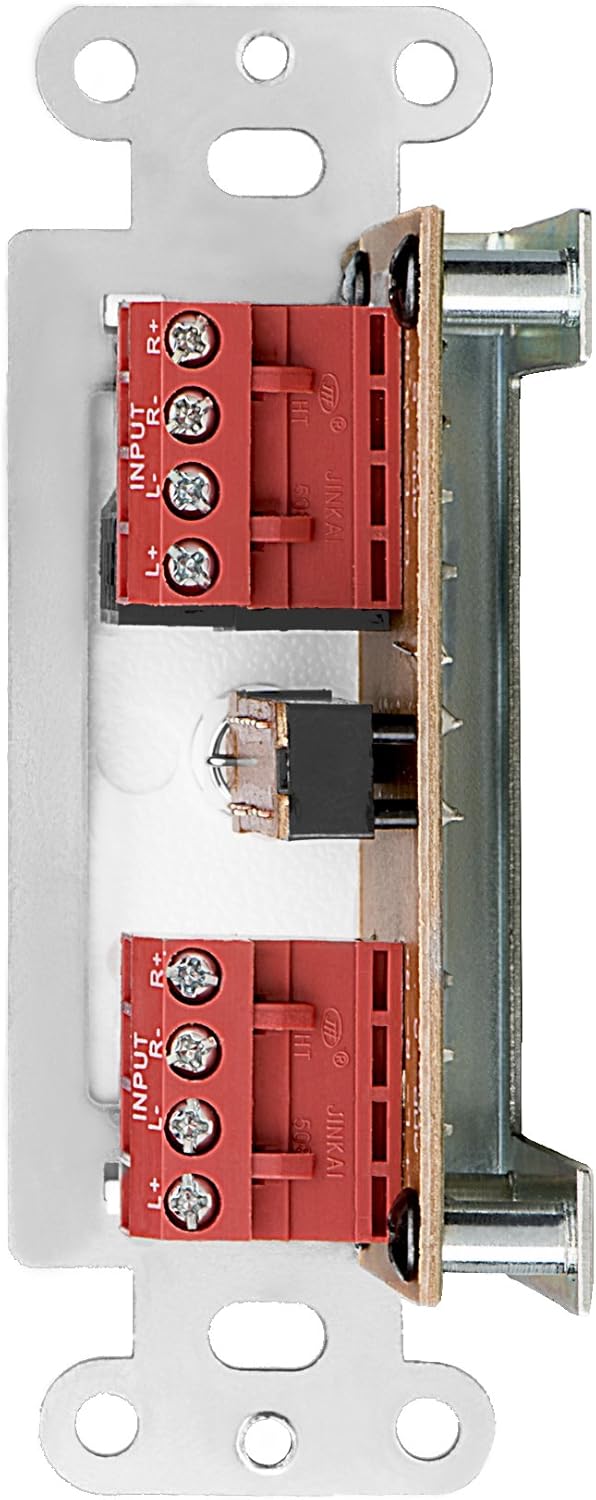
Umfanekiso 1: Ngemuva view of the AB12 switch with clearly labeled input and output terminals for wiring.

Umfanekiso 2: Eksample of speaker wire connections to the removable solderless terminals.
Ukukhweza I-Switch
The AB12 is designed to fit into a standard single-gang junction box with a minimum depth of 2.9 inches. The dimensions of the selector are approximately 1 inch (W) x 2.75 inches (H) x 1.75 inches (D).
- Lungiselela Ibhokisi Le-Junction: Ensure the junction box is securely installed in the wall.
- Faka Iswishi: Carefully push the wired AB12 switch into the junction box. Ensure wires are not pinched.
- I-Faceplate evikelekile: Attach the desired color faceplate (white, beige, or light almond options are typically included) over the switch and secure it to the junction box using the provided screws.

Figure 3: Mounting brackets for securing the switch within a standard gang box.
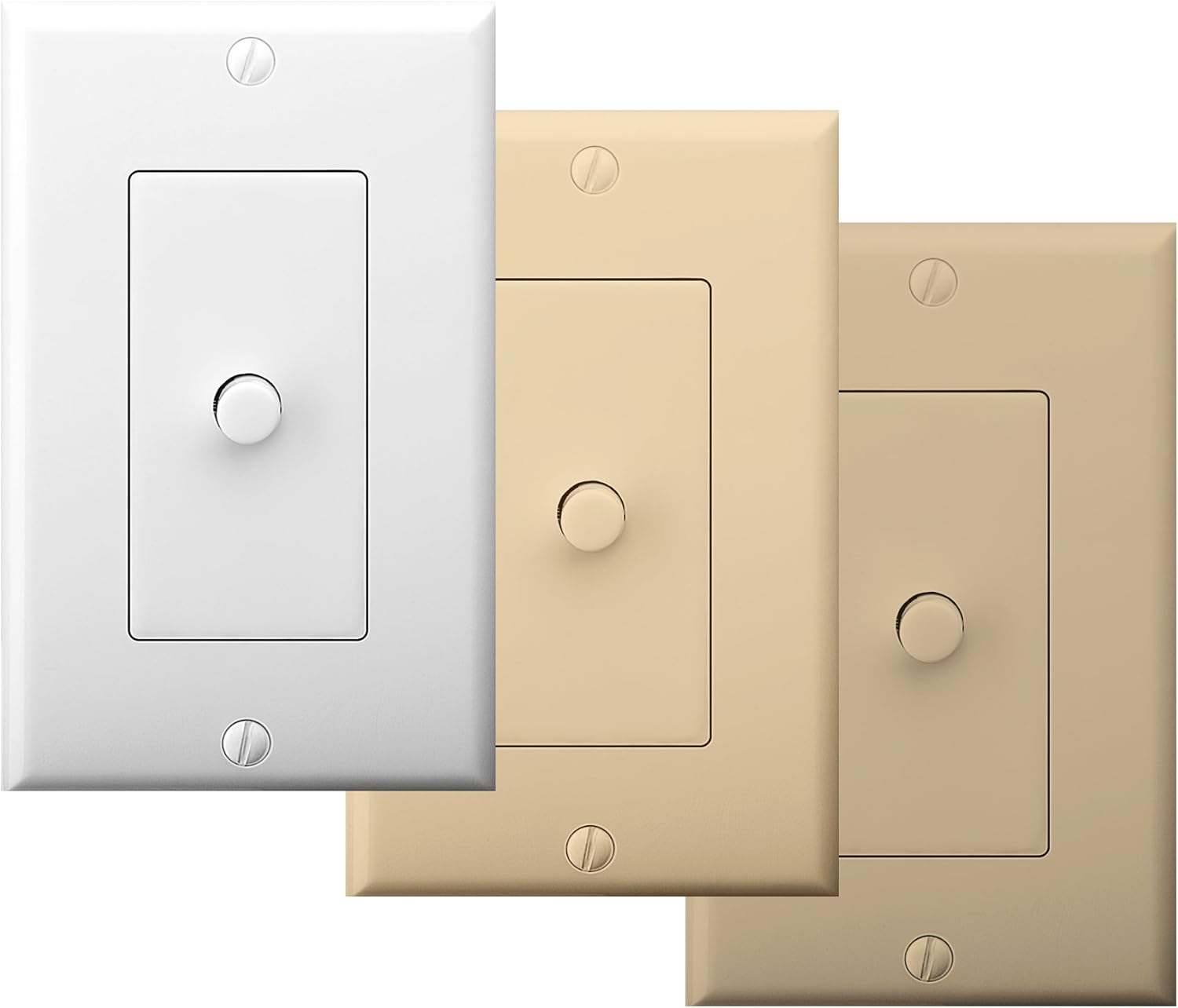
Figure 4: The AB12 switch typically includes multiple faceplate colors for aesthetic integration.
Imiyalelo yokusebenza
The OSD Audio AB12 switch provides a simple push-button mechanism to select between two audio configurations.
Ukusebenza
- Okubili Amplifiers to One Speaker Pair: Xhuma ezimbili amplifiers to 'AMP A INPUT' and 'AMP B INPUT' respectively. Connect one pair of speakers to 'OUTPUT'. Press the button to switch between Ampi-lifier A kanye Amplifier B playing through the single speaker pair.
- Eyodwa Amplifier to Two Speaker Pairs: Xhuma eyodwa amplifier to 'AMP A INPUT'. Connect two pairs of speakers to 'OUTPUT' (one pair wired to the 'A' side of the output terminals, the other to the 'B' side, if applicable, or use the switch to select between two distinct output paths). Press the button to switch between Speaker Pair A and Speaker Pair B playing from the single ampokokuphila.
The switch is designed to allow power to flow to speakers from either A or B, but not from both simultaneously. This prevents potential damage to amplifiers or speakers due to conflicting signals.

Figure 5: The AB12 switch integrated into an audio system, allowing selection between different sources or destinations.
Isondlo
The OSD Audio AB12 In-Wall Speaker Selector requires minimal maintenance.
- Ukuhlanza: To clean the faceplate, gently wipe it with a soft, dry cloth. Avoid using abrasive cleaners or solvents, as these can damage the finish.
- Izixhumanisi: Periodically check all wiring connections to ensure they remain secure. Loose connections can lead to signal loss or poor audio quality.
- Imvelo: Ensure the switch is installed in a dry environment, away from excessive heat or moisture.
Ukuxazulula inkinga
If you encounter issues with your AB12 speaker selector, refer to the following troubleshooting steps:
| Inkinga | Imbangela Engenzeka | Isixazululo |
|---|---|---|
| Awukho umsindo ovela kuzipikha | Ukuxhumeka kwezintambo okuxekethile Indawo yokushintsha engalungile Amplifier or speaker issue | Check all speaker wire connections at the AB12 switch and at the amplifier/speakers. Ensure the switch is fully engaged in the desired A or B position. Verify amplifier and speakers are functioning correctly by bypassing the switch temporarily. |
| Sound from only one speaker (left or right channel) | I-polarity yezintambo engalungile Loose connection for one channel Indlela yokushintsha enephutha | Verify correct positive (+) and negative (-) wiring for both left and right channels. Check connections for the affected channel. If the issue persists, the internal switch mechanism may be faulty; contact support. |
| Difficulty fitting into standard gang box | Insufficient depth or width in junction box Excessive wiring inside box | Ensure the junction box meets the minimum depth requirement (2.9 inches). Carefully arrange wires to minimize bulk. Some older or non-standard boxes may require minor modification (e.g., widening the opening) or a deeper box. |
| Distorted or poor audio quality | Incorrect wire gauge Ukuxhumana okuxekethile Exceeding power rating | Use recommended 14-16 gauge speaker wire. Check all connections. Ensure the amplifier output does not exceed the 100-watt rating of the switch. |
Imininingwane
| Isici | Ukucaciswa |
|---|---|
| Imodeli | AB12 |
| Imodi yokusebenza | Ukushintsha kwe-A/B |
| Isilinganiso samandla | 100 Watts ngesiteshi ngasinye |
| Impendulo Yemvamisa | 20Hz ukuze 20KHz |
| I-Speaker Wire Gauge | Up to 14 gauge (14-16 gauge recommended) |
| Uhlobo Lwesixhumi | Amatheminali angena-Solderless |
| Uhlobo lwe-Actuator | Inkinobho Yokucindezela |
| Inombolo Yezikhundla | 2 |
| Uhlobo Lokukhweza | Standard Single-Gang Box Mount |
| Ubukhulu bomkhiqizo (L x W x H) | 4.5 x 2.75 x 2.5 amayintshi |
| Isisindo sento | 6.4 amakhilogremu |
| Impahla (Izindlu) | Ipulasitiki |
| Izinto Zokuthintana | Insimbi |
| Umbala | White (with additional faceplate options) |
Iwaranti kanye Nokusekela
OSD Audio products are designed for reliability and performance. For warranty information or technical support, please refer to the official OSD Audio webisayithi noma uxhumane nomnyango wabo wesevisi yamakhasimende. Gcina irisidi lakho lokuthenga njengobufakazi bokuthenga kwanoma yiziphi izimangalo zewaranti.
Ukusekelwa Kwe-inthanethi: www.osdaudio.com