
Isingeniso
This manual provides essential instructions for setting up, operating, and maintaining your Canon PowerShot ELPH 310 HS digital camera. Please read this manual thoroughly to ensure proper use and to maximize your camera's performance.
Yini EseBhokisini
Uma usuyikhipha, qinisekisa ukuthi zonke izinto ezilandelayo zifakiwe:
- Canon PowerShot ELPH 310 HS Camera
- Iphakethe Lebhethri NB-4L
- Battery Charger CB-2LV
- Ibhande Lesihlakala
- Ikhebula le-USB
- I-CD-ROM (Isofthiwe/Abashayeli)
Setha
1. Ukushaja Ibhethri
Insert the Battery Pack NB-4L into the Battery Charger CB-2LV. Plug the charger into a power outlet. The charging indicator light will show the charging status. Once fully charged, remove the battery.
2. Ukufaka ibhethri nekhadi lememori
Open the battery/card compartment cover on the camera. Insert the charged battery pack, ensuring correct orientation. Insert a compatible SD/SDHC/SDXC memory card into the card slot until it clicks into place. Close the compartment cover securely.

Isithombe: Ngaphambili view of the Canon PowerShot ELPH 310 HS digital camera, showcasing its silver finish and lens.
Isebenzisa Ikhamera
1. Vula/Vala
Cindezela inkinobho KHANYISA CISHA button located on the top or side of the camera to power it on or off. The lens will extend when powered on.
2. Izithombe Eziyisisekelo
- Ukugxila: Gently press the shutter button halfway down to focus. The camera will emit a beep and display a green frame when focus is achieved.
- Ukuthatha Isithombe: Cindezela inkinobho yokuvala ngokugcwele phansi ukuze uthwebule isithombe.
- Sondeza: Use the zoom lever around the shutter button to adjust the optical zoom (8x).
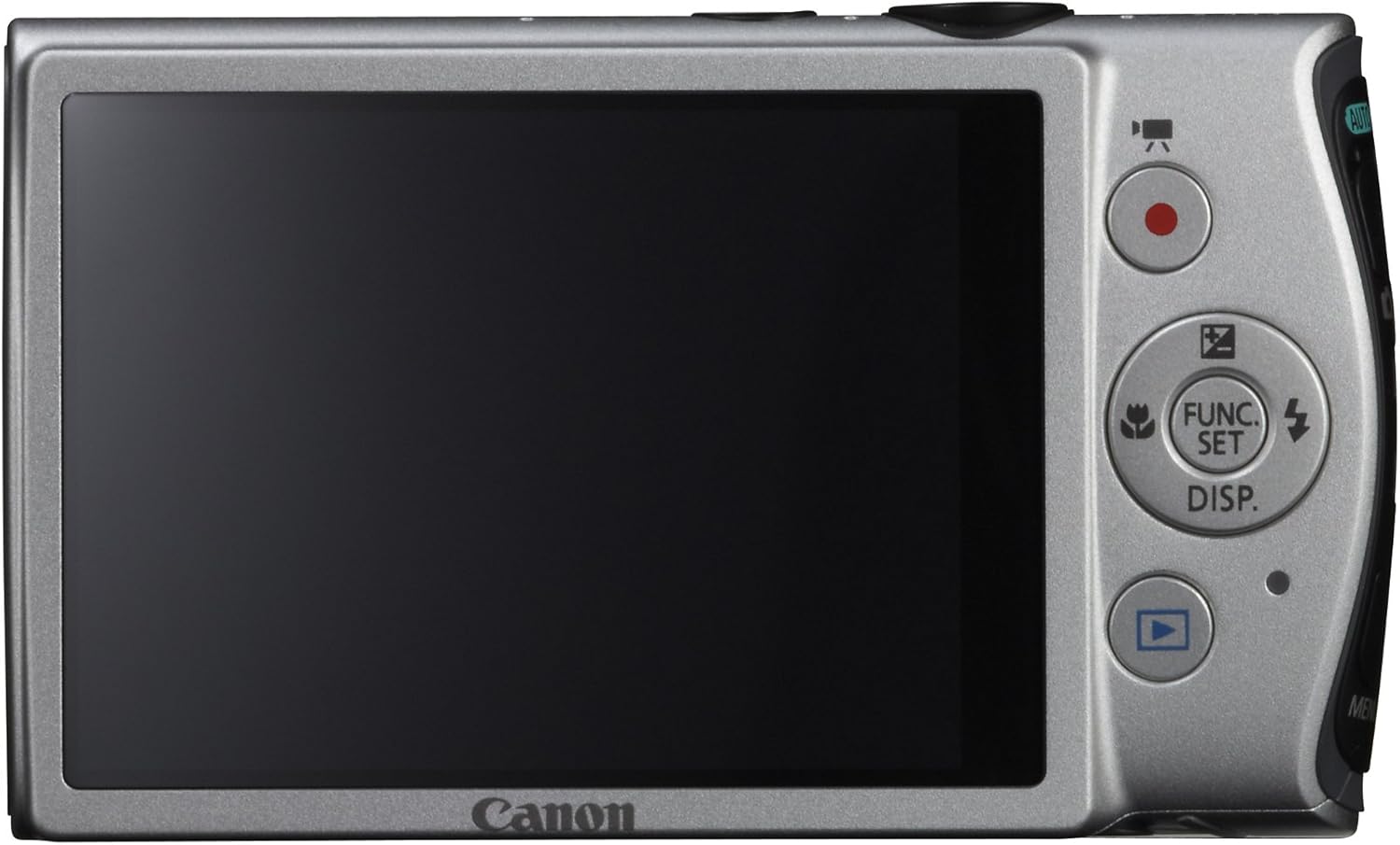
Isithombe: Emuva view of the Canon PowerShot ELPH 310 HS, displaying the 3.0-inch LCD screen and various control buttons for navigation and function selection.
3. Izindlela Zokudubula
The PowerShot ELPH 310 HS offers various shooting modes to suit different situations. Use the mode dial or menu to select:
- I-Smart AUTO: Automatically detects scenes and applies optimal settings for point-and-shoot simplicity.
- Uhlelo (P): Allows for automatic aperture/shutter speed selection based on conditions, with some user control.
- Movie Digest: Records a short video clip before each still image, combining them into a daily video.
- I-High-Speed Burst: Captures rapid action at approximately 8.7 frames per second.
- Super Slow Motion Movie: Records video at high frame rates (up to 240 fps) for slow-motion playback.
- Special Scene Modes: Includes options like Handheld Night Scene, Portrait, Beach, Snow, Fireworks, Fisheye Effect, Miniature Effect, Toy Camera Effect, and more for specific photographic effects.
4. Ukuqoshwa Kwevidiyo
To record videos, press the dedicated movie button. The camera supports Full HD 1080p video at 24 fps and 720p HD video at 30 fps. The iFrame movie format is also supported for easier editing.
5. Image Stabilization (Intelligent IS)
The camera features Intelligent IS, which automatically selects the best shake correction method for your shooting situation. This includes modes for stills (Normal, Panning, Macro, Tripod) and videos (Dynamic, Powered, Macro, Tripod) to ensure steady images and footage.
Isondlo
1. Ukuhlanza Ikhamera
- Ilensi: Use a soft, lint-free cloth specifically designed for camera lenses. Avoid touching the lens directly with fingers.
- Isikrini se-LCD: Wipe gently with a soft, dry cloth. Do not use abrasive cleaners.
- Umzimba Wekhamera: Use a soft, dry cloth to wipe away dust and smudges.
2. Ukunakekelwa Kwebhethri
- Gcina amabhethri endaweni epholile, neyomile uma engasetshenziswa.
- Gwema ukushajwa ngokugcwele ibhethri njalo ukuze welule ubude bayo bempilo.
- Ungabeki amabhethri emazingeni okushisa aphezulu kakhulu.
3. Isitoreji
When storing the camera for extended periods, remove the battery and memory card. Store the camera in a dry, dust-free environment, preferably in a camera bag or case.
Ukuxazulula inkinga
| Inkinga | Imbangela Engenzeka / Isixazululo |
|---|---|
| Ikhamera ayivuli amandla. | Battery may be depleted or incorrectly inserted. Ensure battery is charged and inserted correctly. |
| Izithombe zifiphele. | Camera shake, subject movement, or incorrect focus. Ensure proper grip, use Intelligent IS, or check focus settings. |
| Iphutha lekhadi lememori. | Memory card may be full, corrupted, or incompatible. Try formatting the card (this will erase all data) or use a different card. |
| I-Flash ayidubuli. | Flash may be set to OFF or Red-Eye Reduction mode. Check flash settings in the menu. |
| Ayikwazi ukurekhoda ividiyo. | Memory card may be full or too slow. Ensure sufficient space and use a high-speed memory card. |
Imininingwane
| Isici | Imininingwane |
|---|---|
| Igama Lemodeli | Canon PowerShot ELPH 310 HS |
| Inzwa yesithombe | I-12.1 Megapixel CMOS |
| Iphrosesa yesithombe | I-DIGIC 4 |
| I-Optical Zoom | 8x |
| Ilensi | I-Engela Ebanzi engu-28mm (okulingana no-35mm: 28-224mm) |
| Ukuzinzisa Isithombe | I-Optical (i-IS ehlakaniphile) |
| Ukuqoshwa kwevidiyo | Full HD 1080p (24 fps), HD 720p (30 fps) |
| Isikrini se-LCD | 3.0-inch PureColor LCD (461,000 dots) |
| Imidiya Yesitoreji | Amakhadi Ememori e-SD, SDHC, SDXC |
| Ukuxhumana | I-HDMI, i-USB |
| Ibhethri | NB-4L Lithium-ion Battery Pack |
| Isisindo | Cishe amakhilogremu angu-0.31 (kufaka phakathi ibhethri nekhadi lememori) |
Iwaranti kanye Nokusekela
For warranty information and technical support, please refer to the documentation included with your product or visit the official Canon webindawo. Gcina irisidi lakho lokuthenga njengobufakazi bokuthenga izimangalo zewaranti.
Usekelo lwe-Canon Webindawo: www.usa.canon.com/support