
Isingeniso
The GIGABYTE GM-M7600 is a wireless precision optical mouse designed for comfortable and reliable use. This manual provides instructions for setting up, operating, maintaining, and troubleshooting your device.
Okuqukethwe Kwephakheji
Sicela uhlole okuqukethwe kwephakheji ukuze uqinisekise ukuthi zonke izinto zikhona:
- GIGABYTE GM-M7600 Wireless Optical Mouse
- Portable Nano USB Receiver
- 2 x AAA Amabhethri
Setha
1. Ukufaka Amabhethri
The GM-M7600 mouse requires two AAA batteries for operation. The batteries are included in the package.
- Thola ikhava yengxenye yebhethri ngaphansi kwegundane.
- Gently slide or lift the cover to open the compartment.
- Faka amabhethri amabili e-AAA, uqinisekise ukuthi ama-terminals amahle (+) nangalungile (-) ahambisana kahle nezimpawu ezingaphakathi kwegumbi.
- Vala ikhava yengxenye yebhethri ngokuphephile.
2. Ixhuma Isamukeli se-USB
The mouse connects to your computer via a portable Nano USB receiver.
- Locate the Nano USB receiver. It may be stored inside the mouse's battery compartment or packaged separately.
- Plug the Nano USB receiver into an available USB port on your computer (Laptop or Personal Computer).
- Your operating system (e.g., Windows XP, Linux) should automatically detect and install the necessary drivers. This process may take a few moments.
- Once the drivers are installed, the mouse is ready for use.
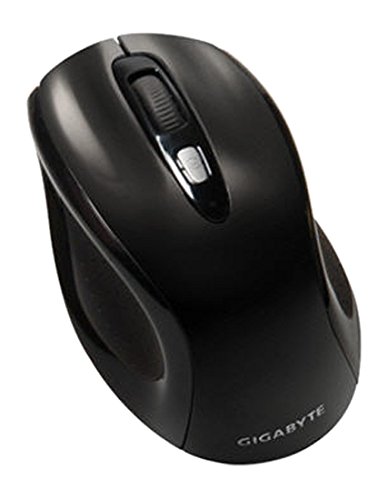
Umfanekiso 1: GIGABYTE GM-M7600 Wireless Optical Mouse. This image displays the ergonomic design of the mouse, highlighting its form factor and the location of its buttons. The Nano USB receiver is typically stored within the mouse or connected to a computer's USB port.
Imiyalelo yokusebenza
1. Ukuvula/Ukucisha
The mouse typically has a power switch on its underside. Slide the switch to the 'ON' position to activate the mouse. Slide it to 'OFF' when not in use to conserve battery life.
2. Adjusting DPI (Sensitivity)
The GM-M7600 features an adjustable DPI switch, allowing you to change the mouse sensitivity between 800 DPI and 1600 DPI. This switch is usually located near the scroll wheel. Press the DPI button to toggle between the two sensitivity settings.
3. Basic Mouse Imisebenzi
- Chofoza kwesokunxele: Inkinobho eyinhloko yokukhetha izinto, ukuvulwa files, kanye nokusebenzisana nesofthiwe.
- Chofoza kwesokudla: Inkinobho yesibili yokufinyelela amamenyu womongo kanye nezinketho ezengeziwe.
- Isondo Lokuskrola: Isetshenziselwa ukupheqa amadokhumenti kanye web amakhasi. Ingase futhi isebenze njengenkinobho yokuchofoza okuphakathi.
Isondlo
1. Ukuhlanza
Ukuze kugcinwe ukusebenza kahle kanye nokubukeka okuhle:
- Disconnect the mouse from your computer and turn off the power switch.
- Sebenzisa indwangu ethambile, engenalinti kancane dampefakwe ngamanzi noma isixazululo sokuhlanza esithambile sokusula ubuso begundane.
- Gwema ukusebenzisa amakhemikhali anamandla, izihlanzi ezihudulayo, noma ukufafaza uketshezi ngqo egundwini.
- Clean the optical sensor area on the underside of the mouse with a dry cotton swab to remove any dust or debris.
2. Ukushintshwa Kwebhethri
When the mouse performance degrades or it stops responding, it may be time to replace the batteries.
- Cima igundane usebenzisa inkinobho yamandla.
- Open the battery compartment as described in the 'Installing Batteries' section.
- Susa amabhethri e-AAA amadala.
- Insert two new AAA batteries, observing the correct polarity (+/-).
- Close the battery compartment and turn the mouse back on.
Ukuxazulula inkinga
If you encounter issues with your GIGABYTE GM-M7600 mouse, try the following solutions:
- Igundane aliphenduli:
- Qinisekisa ukuthi igundane livuliwe.
- Hlola ukuthi amabhethri afakwe kahle yini nokuthi ashaje ngokwanele. Shintsha uma kudingeka.
- Ensure the Nano USB receiver is securely plugged into a working USB port on your computer. Try a different USB port.
- Qala kabusha ikhompuyutha yakho.
- Ukunyakaza kwesikhombisi okungajwayelekile:
- Hlanza inzwa yokubona ngaphansi kwegundane.
- Qinisekisa ukuthi usebenzisa igundane endaweni efanele. Gwema izindawo ezikhanya kakhulu noma ezisobala.
- Check for any wireless interference. Move the mouse closer to the receiver or away from other wireless devices.
- DPI switch not working:
- Qinisekisa ukuthi igundane livuliwe futhi lixhunyiwe.
- Cindezela inkinobho ye-DPI ngokuqinile.
Imininingwane
| Igama Lemodeli | I-GM-M7600 |
| Ibhrendi | I-GIGABYTE |
| Ubuchwepheshe bokuxhumana | 2.4GHz Radio Frequency Wireless |
| Ukutholwa Kokuhamba | I-Optical |
| I-DPI eguquguqukayo | 800/1600 DPI |
| Inombolo yezinkinobho | 3 (Kwesobunxele, Kwesokudla, Skrola Isondo/Ukuchofoza Okuphakathi) |
| Umthombo wamandla | 2 x AAA Amabhethri (afakiwe) |
| Uhlobo Lomamukeli | Portable Nano USB Receiver |
| Amadivayisi Ahambisanayo | I-Laptop, Ikhompyutha yomuntu siqu |
| Usekelo Lwesistimu Esebenzayo | Linux, Windows XP |
| Impahla Ebiyelwe | Plastic with Rubberized Finish |
| Umbala | Mnyama |
Iwaranti kanye Nokusekela
For warranty information and technical support, please refer to the warranty card included with your product or visit the official GIGABYTE webindawo. Gcina irisidi yakho yokuthenga ukuze uthole izimangalo zewaranti.