
Isingeniso
Thank you for choosing the Airmaster LC30AP 30-inch Pedestal Fan. This manual provides essential information for the safe operation, assembly, maintenance, and troubleshooting of your new fan. Please read these instructions thoroughly before use and retain them for future reference.
The Airmaster LC30AP is a robust 30-inch pedestal fan designed for efficient air circulation in various settings, including outdoor environments. It features three speed settings and an oscillation function for broad coverage.
Imiyalo yokuphepha
Ukuze unciphise ingozi yomlilo, ukushaqeka kukagesi, noma ukulimala, qaphela lezi zinyathelo zokuphepha ezilandelayo:
- Ngaso sonke isikhathi khipha ifeni ekuxhumekeni kukagesi ngaphambi kokuyihlanza, ukuyisevisa, noma ukuyihambisa.
- Do not operate the fan with a damaged cord or plug. If the cord or plug is damaged, contact a qualified service technician.
- Qinisekisa ukuthi isiphephetha-moya sibekwe endaweni ezinzile, eneleveli ukuvimbela ukuthipha.
- Keep hands, hair, clothing, and other objects away from the fan blades during operation.
- Do not insert fingers or any objects through the fan guard.
- Do not use the fan in areas where flammable liquids or gases are stored or present.
- This fan is designed for outdoor use. Ensure proper electrical connections and protection from direct water exposure if used outdoors.
- Do not use the fan near a window or in direct sunlight for extended periods, as this may cause overheating.
- Lo mkhiqizo uqukethe amakhemikhali aziwa eSifundazweni Sase-California ukuze abangele umdlavuza kanye nokukhubazeka kokuzalwa noma okunye ukulimala kokuzala. Geza izandla ngemva kokuphatha.
Okuqukethwe Kwephakheji
Qinisekisa ukuthi zonke izingxenye zikhona futhi azilimele lapho uvula iphakheji:
- Fan Head Assembly (includes blades and protective grille)
- Pedestal Stand Pole
- Isisekelo Esiyindilinga
- Isilawuli kude
- Ihadiwe Yokufaka (izikulufo, amawasha, amantongomane)
- Incwadi Yomsebenzisi (le dokhumenti)
Ukuhlanganisa nokusetha
Follow these steps to assemble your Airmaster LC30AP Pedestal Fan:
- Attach the Base to the Stand: Place the round base on a flat surface. Insert the bottom end of the pedestal stand pole into the central opening of the base. Secure it using the provided screws and washers from underneath the base. Tighten firmly.
- Attach the Fan Head to the Stand: Carefully lift the fan head assembly. Align the mounting bracket on the bottom of the fan head with the top of the pedestal stand pole. Secure it with the designated screws or locking mechanism. Ensure the fan head is stable and does not wobble.
- Misa Umlandeli: Place the assembled fan on a firm, level surface, ensuring there is adequate space around it for optimal airflow and oscillation. Keep it away from curtains or other objects that could obstruct the fan blades.
- Xhuma Emandleni: Plug the fan's power cord into a standard electrical outlet. Ensure the outlet matches the fan's voltage izidingo.
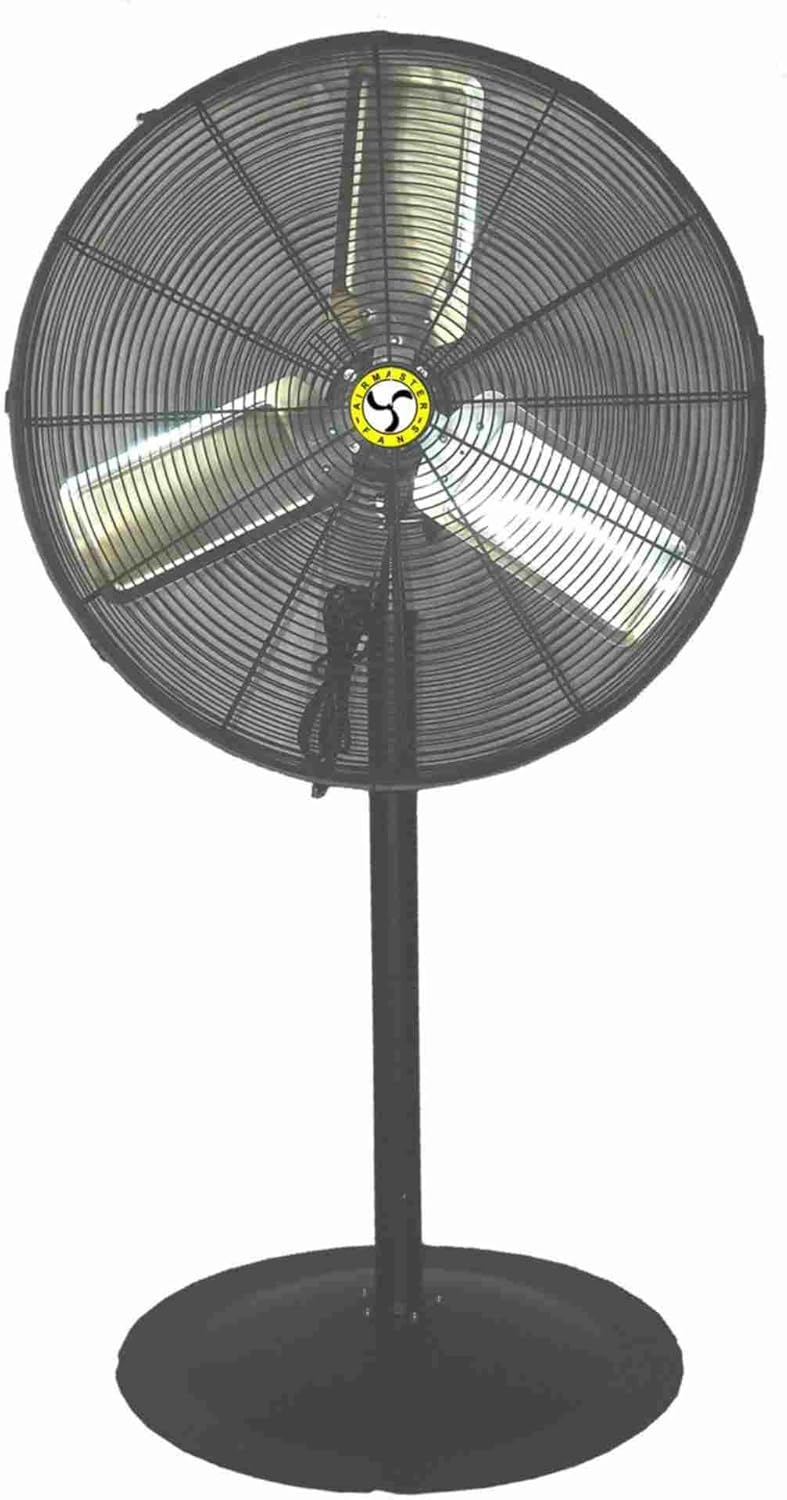
This image displays the Airmaster LC30AP 30-inch Pedestal Fan. It features a large circular fan head with a protective metal grille, three fan blades visible through the grille, and a central Airmaster logo. The fan head is mounted on a tall, sturdy black pedestal stand, which is attached to a wide, round black base for stability. A power cord is visible near the base of the fan head.
Imiyalelo yokusebenza
Your Airmaster LC30AP Pedestal Fan can be operated using the controls on the fan unit or the included remote control.
Vula/Vala
- Press the 'Power' button on the control panel or remote to turn the fan on or off.
Ukulawula Isivinini
The fan has 3 speed settings: Low, Medium, and High.
- Press the 'Speed' button repeatedly on the control panel or remote to cycle through the available speeds.
Umsebenzi we-Oscillation
The oscillation feature allows the fan head to sweep from side to side, distributing air over a wider area.
- Press the 'Oscillation' button on the control panel or remote to start or stop the oscillation.
Isilawuli kude
The remote control allows convenient operation from a distance. Ensure the remote has working batteries and is pointed towards the fan's receiver.
Isondlo
Regular maintenance ensures optimal performance and extends the life of your fan.
Ukuhlanza
- Njalo khipha isiphephetha-moya ngaphambi kokuhlanza.
- Sebenzisa okuthambile, damp indwangu yokusula indawo yangaphandle yesiphephetha-moya. Ungasebenzisi izinto zokuhlanza abrasive noma izincibilikisi.
- To clean the fan blades, you may need to remove the front grille. Refer to the assembly instructions in reverse for safe removal and reattachment. Carefully wipe the blades with a soft cloth.
- Qinisekisa ukuthi zonke izingxenye zomile ngokuphelele ngaphambi kokufaka ifeni kabusha.
Isitoreji
- If storing the fan for an extended period, clean it thoroughly and cover it to protect it from dust.
- Gcina ifeni endaweni epholile, eyomile.
Ukuxazulula inkinga
Uma uhlangabezana nezinkinga ngomlandeli wakho, bheka izinkinga ezilandelayo nezisombululo:
| Inkinga | Imbangela Engenzeka | Isixazululo |
|---|---|---|
| Ifeni ayivuli. | Akukho ukunikezwa kwamandla. Intambo kagesi ayixhunyiwe ngokuphelele. Amabhethri wesilawuli kude afile. | Hlola ukuthi indawo kagesi iyasebenza yini. Ensure the power cord is securely plugged into the outlet and the fan. Shintsha amabhethri esilawuli kude. |
| Ukugeleza komoya okubuthakathaka. | Ama-fan blade angcolile. Obstruction in front or behind the fan. Fan is on a low-speed setting. | Clean the fan blades and grille. Susa noma yiziphi izithiyo. Khulisa ukulungiselelwa kwesivinini sabalandeli. |
| Ifeni yenza umsindo ongajwayelekile. | Izingxenye ezikhululekile. Ifeni hhayi endaweni esezingeni. Imfucumfucu ibanjwe ngama-blades. | Check all assembly screws and tighten if necessary. Beka ifeni endaweni ezinzile, esezingeni. Unplug the fan and carefully inspect for and remove any debris. |
| I-oscillation ayisebenzi. | Umsebenzi wokunyakaza awusebenzi. Ukuvinjelwa kwemishini. | Press the 'Oscillation' button. Ensure nothing is blocking the fan head's movement. |
Imininingwane
| Ibhrendi | Airmaster |
| Igama Lemodeli | LC30AP |
| Idizayini yabalandeli bakagesi | Ifeni Yaphansi / Ifeni Yezinyawo |
| Ubukhulu bomkhiqizo | 30"D x 8"W x 6"H (Fan Head) |
| Isisindo sento | 50 Amakhilogremu |
| Umthombo wamandla | I-Corded Electric |
| Wattage | 186 watts |
| Inombolo yama-Blades | 3 |
| Inombolo Yamazinga Amandla | 3 |
| Isici Esikhethekile | Kuyahlekisa |
| Indlela Yokulawula | Isilawuli kude |
| Ukusetshenziswa Kwangaphakathi/Kwangaphandle | Ngaphandle |
| Qeda Uhlobo | Metallic/Powder Coated |
| Incazelo Met | OSHA, UL |
| I-UPC | 783429715310 |
Iwaranti kanye Nokusekela
For warranty information and customer support regarding your Airmaster LC30AP Pedestal Fan, please contact the manufacturer, Airmaster Fan, directly. Details regarding specific warranty periods and terms are typically provided with your purchase documentation or can be obtained from the manufacturer's official webindawo.
Please note that extended protection plans offered by third parties are separate from the manufacturer's warranty and should be consulted with the respective provider.