
Isingeniso
The Nokia Bluetooth Stereo Headset BH-905 is designed to provide a superior audio experience with active noise cancellation and wide compatibility. This manual provides instructions for setting up, operating, and maintaining your headset to ensure optimal performance.
The headset features 10 microphones: 8 dedicated to capturing ambient noise for cancellation and 2 for capturing speech in noisy environments. It offers versatile connectivity, supporting both wireless Bluetooth and wired connections with various devices.
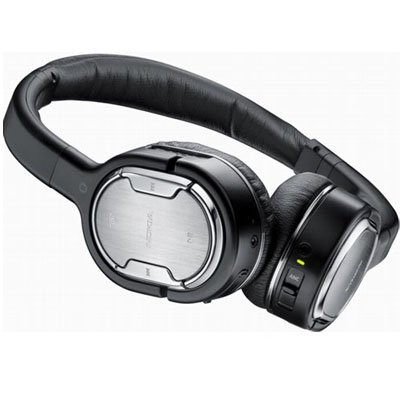
Image: The Nokia Bluetooth Stereo Headset BH-905, showcasing its sleek design and over-ear cups.
Izici Eziyinhloko
- I-Active Noise Cancellation (ANC): Significantly reduces ambient noise for an immersive listening experience.
- 10 Imakrofoni: Utilizes 8 microphones for noise capture and 2 for clear speech transmission in loud surroundings.
- Ukuhambisana Okubanzi: Connects wirelessly via Bluetooth or wired to a variety of mobile phones, music players, and other audio devices.
- Seamless Control: Intuitive controls allow for easy switching between music and calls without needing to look at the device.
Setha
Ukubhanqa kwe-Bluetooth
- Ensure your headset is charged and powered off.
- Yenza kusebenze i-Bluetooth kudivayisi yakho yeselula.
- Press and hold the power button on the headset until the indicator light flashes blue rapidly, indicating pairing mode.
- On your device, search for Bluetooth devices and select "Nokia BH-905" from the list.
- If prompted, enter the passcode (usually "0000").
- Once paired, the indicator light will turn solid blue or flash slowly.
Ukuxhuma kwentambo
For devices without Bluetooth or when battery is low, use the provided audio cables. The headset includes plugs for standard audio jacks and airplane adapters for versatile use.
- Connect one end of the audio cable to the headset's audio input port.
- Connect the other end to your audio source (e.g., mobile phone, MP3 player, airplane entertainment system).
Imiyalelo yokusebenza
Vula/Vala
- Ukuze uvule, cindezela bese ubamba inkinobho yokuvula kuze kube yilapho isibani sesikhombisi sikhanya.
- Ukuze ucime, cindezela bese ubamba inkinobho yokuvula kuze kube yilapho isibani sesikhombisi sicima.
Ukukhanselwa Kwemisindo Esebenzayo (ANC)
The BH-905 features advanced Active Noise Cancellation technology. With 8 dedicated microphones, it captures ambient low-frequency noise and generates an inverse sound wave, effectively canceling out unwanted sounds. This allows for a clearer audio experience, especially in noisy environments like airplanes or busy streets.
- To activate ANC, locate the ANC switch on the headset and slide it to the 'On' position. A green indicator light will confirm activation.
- To deactivate ANC, slide the switch to the 'Off' position.
Ukuphathwa Kwezingcingo
The headset is equipped with 2 microphones specifically designed for speech. These microphones not only capture your voice clearly but also work to cancel out ambient noise, ensuring that the person you are speaking with hears you, not your surroundings.
- Ukuphendula / Ukuqeda Amakholi: Use the dedicated call button on the headset.
- Switching between Music and Calls: The headset allows for seamless transitions between listening to music and taking calls. When a call comes in, your music will pause, and you can answer the call directly from the headset.
Ukudlala Komculo
Control your music directly from the headset using the intuitive buttons. The design supports "blind usage," meaning you can operate the controls by feel without needing to look at them.
- Dlala/Misa kancane: Use the play/pause button.
- Yeqa Amathrekhi: Use the forward/backward track buttons.
- Ukulawula ivolumu: Lungisa ivolumu usebenzisa izinkinobho zevolumu ezinikezelwe.
Video: An official Nokia video demonstrating the features and technology behind the BH-905 headset, including its active noise cancellation and multi-microphone system for clear audio and calls.
Isondlo
- Clean the headset regularly with a soft, dry cloth.
- Avoid exposing the headset to extreme temperatures, moisture, or direct sunlight.
- Gcina i-headset esikhwameni sayo sokuvikela uma ingasetshenziswa ukuvimbela umonakalo.
- Do not attempt to disassemble or modify the headset, as this will void the warranty.
Ukuxazulula inkinga
- Awekho Amandla: Qinisekisa ukuthi ihedisethi ishajwe ngokugcwele.
- Awukwazi ukubhanqa: Make sure the headset is in pairing mode and within range of your device. Try restarting both devices.
- Awukho Umsindo/Ikhwalithi Yomsindo Engalungile: Check volume levels on both the headset and your connected device. For wired connections, ensure cables are securely plugged in. For Bluetooth, ensure a stable connection.
- I-ANC ayisebenzi kahle: Ensure the ANC switch is in the 'On' position.
- Callers Cannot Hear Me Clearly: Ensure the headset's microphones are not obstructed.
If issues persist, refer to the Nokia support webisayithi noma xhumana nesevisi yamakhasimende ukuze uthole usizo olwengeziwe.
Imininingwane
| Isici | Ukucaciswa |
|---|---|
| Ibhrendi | Nokia |
| Inombolo Yemodeli | 02716j5 |
| I-Form Factor | Over-ear (two_ear) |
| Ukulawula Umsindo | Ukukhansela Umsindo Okusebenzayo |
| Ubuchwepheshe bokuxhumana | I-Bluetooth, Intambo |
| I-Wireless Communication Technology | I-Bluetooth |
| Izici Ezengeziwe | Microphone; Stereo |
| Uhlobo Lokulawula | Ukulawulwa Kwemidiya |
| Isisindo sento | 0.32 Amakhilogremu |
| I-UPC | 758478021477 |
| I-GTIN | 758478021477 |
Iwaranti kanye Nokusekela
The Nokia Bluetooth Stereo Headset BH-905 comes with a Iwaranti yezinyanga eziyi-12 kusukela ngosuku lokuthenga. Lesi siqinisekiso simboza amaphutha okukhiqiza ngaphansi kokusetshenziswa okuvamile. Sicela ugcine ubufakazi bakho bokuthenga ukuze uthole izimangalo zesiqinisekiso.
For technical support, warranty service, or additional information, please visit the official Nokia support website or contact your local Nokia customer service center.