
1. Isingeniso
This manual provides essential information for the safe and efficient operation of your Technaxx Wireless CarPlay & Android Car Monitor TX-361. Please read this manual thoroughly before using the device and retain it for future reference. The TX-361 is designed to integrate modern smartphone connectivity, including Apple CarPlay and Android Auto, into your vehicle without requiring a complex car radio replacement. It also features an integrated DAB digital radio for enhanced audio experience.
2. Ulwazi Lokuphepha
- Njalo sebenzisa idivayisi ngokuzibophezela nangokuhambisana nemithetho yomgwaqo yendawo. Ukushayela okuphazamisekile kungaholela ezingozini.
- Ungazami ukuqaqa noma ukuguqula idivayisi. Lokhu kungase kuqede iwaranti futhi kudale izingozi zokuphepha.
- Gcina idivayisi ikude namazinga okushisa aphezulu, ilanga eliqondile, kanye nomswakama.
- Qinisekisa ukuthi idivayisi ifakwe kahle futhi ayivimbeli view noma uphazamisane nezilawuli zemoto.
- Sebenzisa kuphela ikhebula lamandla kanye nezesekeli ezinikeziwe.
- If the device malfunctions, disconnect it from the power source and contact customer support.
3. Okuqukethwe Kwephakheji
Qinisekisa ukuthi zonke izinto ezibalwe ngezansi zifakiwe kuphakheji yakho:
- DAB 7-inch CarPlay with Touch Screen TX-361
- Power Supply (USB-A to USB-C, 1.5m cable)
- AUX Cable (1m)
- I-DAB Antenna
- Holder (Mounting Bracket)
- Imaniwali yosebenzisayo
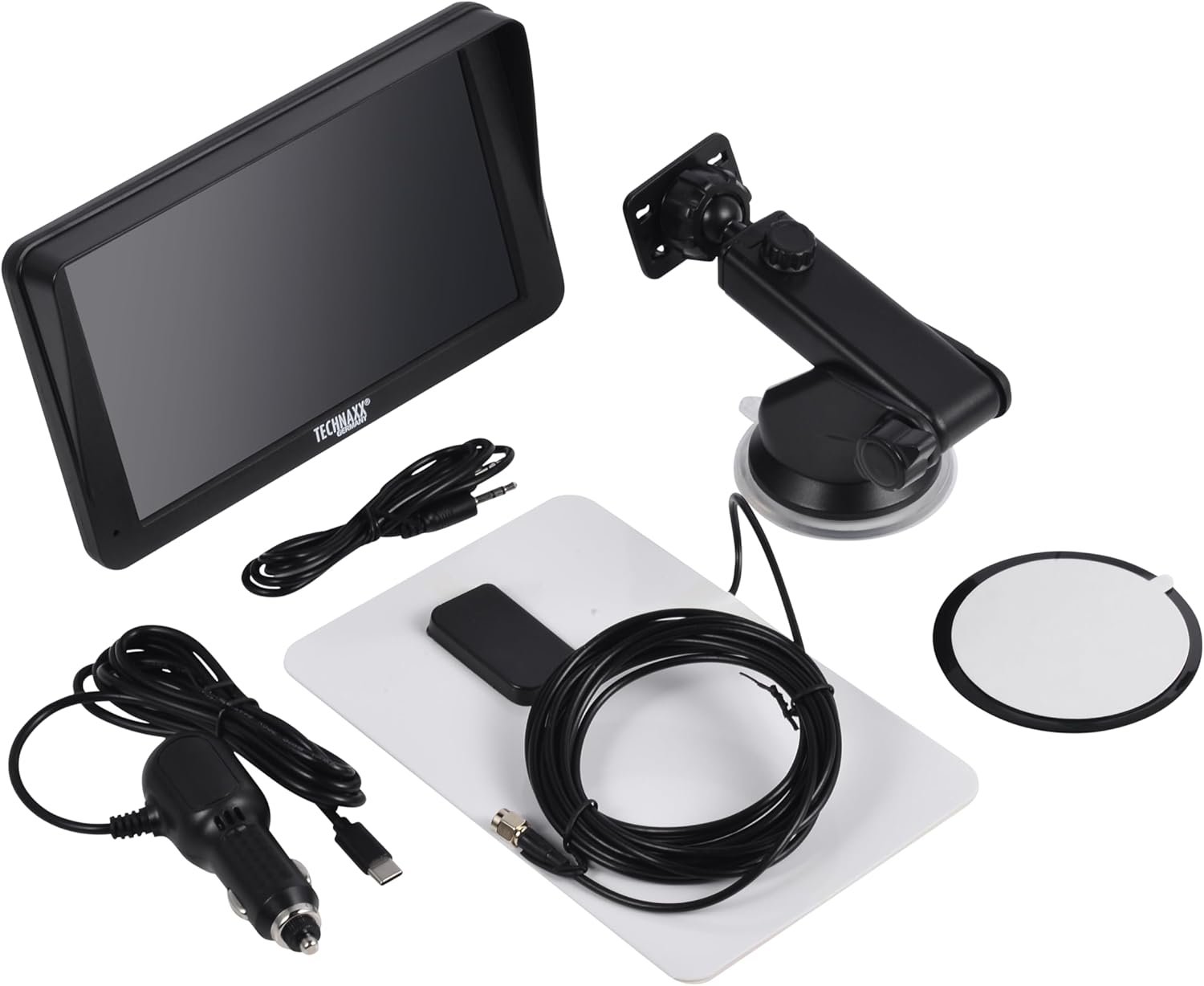
Image: All components included in the Technaxx TX-361 package, neatly laid out.
4. Umkhiqizo Uphelileview
Familiarize yourself with the main components of your TX-361 monitor.
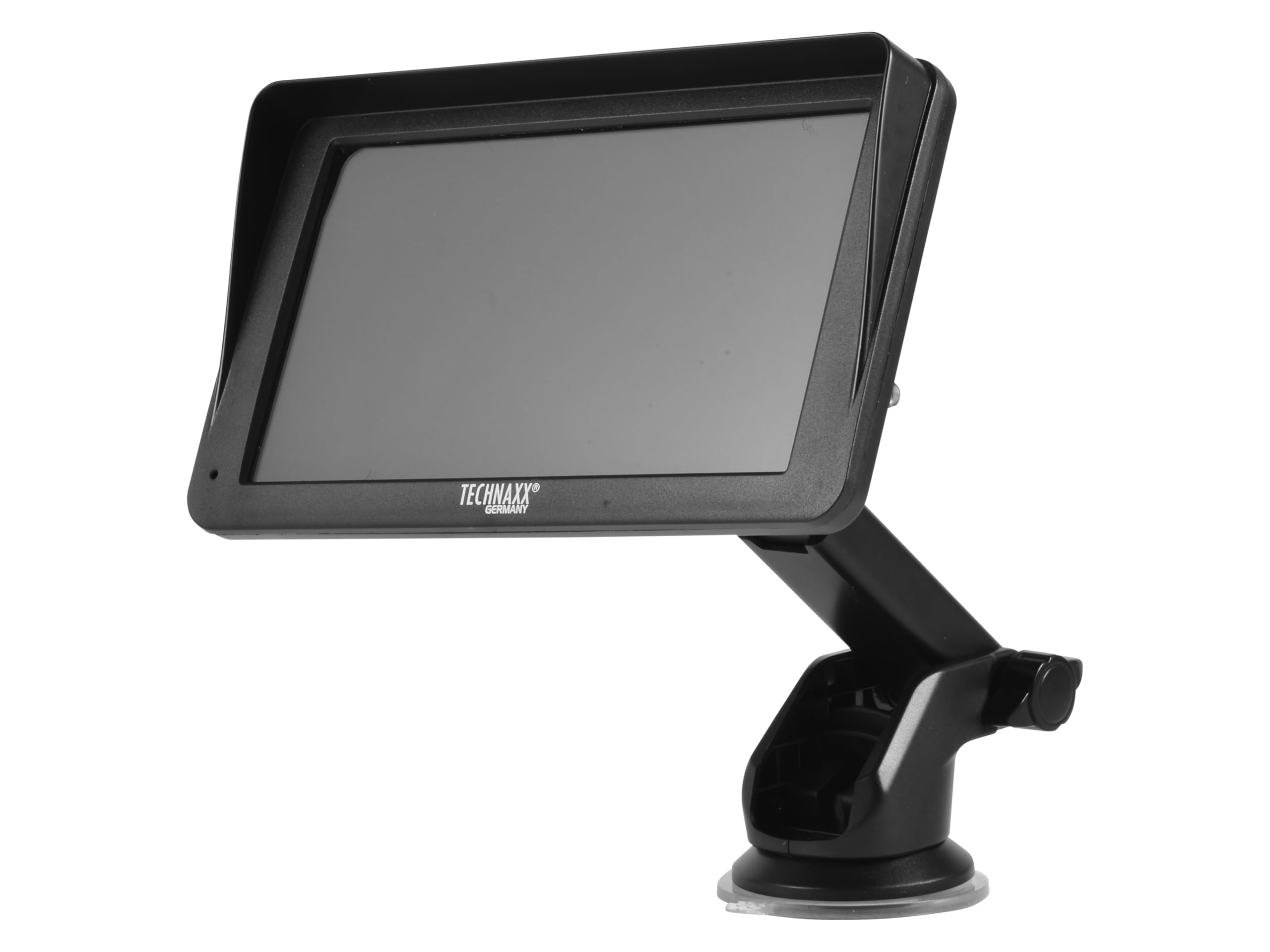
Isithombe: Ngaphambili view of the TX-361 monitor with its 7-inch display and 'TECHN AXX GERMANY' branding, attached to the adjustable mounting stand.

Isithombe: Emuva view of the TX-361 monitor, highlighting the ventilation grilles and the attachment point for the mounting bracket.

Isithombe: Ngemininingwane view of the right side of the TX-361 monitor, showing the power button, reset button, USB-C power input, AUX output, and USB-A port.
4.1. Izingxenye Zedivayisi
- 7-inch Capacitive Touch Screen: Isibonisi esiyinhloko sayo yonke imisebenzi.
- Inkinobho yamandla: Located on the top right side.
- Setha kabusha Inkinobho: Inkinobho yephinikhodi encane yokusetha kabusha isistimu.
- Imbobo ye-USB-C: Okokufaka kwamandla.
- Okukhiphayo kwe-AUX: 3.5mm jack for wired audio transmission.
- Imbobo ye-USB-A: For media playback or charging external devices.
- DAB Antenna Input: Connector for the external DAB antenna.
- Isipikha Esihlanganisiwe: For direct audio playback.
5. Setha
5.1. Ukukhweza Idivayisi
The TX-361 can be mounted on your vehicle's windscreen or dashboard using the provided holder.
- Attach the monitor to the mounting bracket.
- For Windscreen Mounting: Clean the desired area on the windscreen. Press the suction cup firmly against the glass and engage the lever to secure it.
- For Dashboard Mounting: Clean the desired area on the dashboard. If necessary, use the adhesive disc provided for a more secure attachment point for the suction cup. Press the suction cup firmly and engage the lever.
- Lungisa i-engeli yemonitha ngokufanele viewukushaja ngaphandle kokuphazamisa ukushayela kwakho view.

Image: The TX-361 monitor securely mounted on a car dashboard, showing its position relative to the driver's view.

Image: The TX-361 monitor mounted on a car windscreen, demonstrating an alternative placement option.
5.2. Ukuxhunywa kwamandla
- Connect the USB-C end of the power cable to the USB-C port on the monitor.
- Plug the USB-A end of the power cable into the provided 12V/24V cigarette lighter adapter.
- Insert the cigarette lighter adapter into your vehicle's 12V/24V power socket. The device will power on automatically or can be turned on using the power button.
5.3. DAB Antenna Connection
For optimal DAB radio reception, connect the included DAB antenna:
- Connect the DAB antenna cable to the dedicated DAB antenna input on the monitor.
- Mount the DAB antenna on your windscreen or another suitable location, ensuring it has clear line of sight for best signal reception.
6. Iziqondiso Zokusebenza
6.1. Ukuvula/Ukucisha
- Vula: The device typically powers on automatically when connected to the vehicle's power. If not, press and hold the power button on the top right side.
- Cisha ugesi: Press and hold the power button until the device shuts down. A short press will turn the screen off/on.
6.2. Initial Setup and Smartphone Connection
The TX-361 supports wireless Apple CarPlay and Android Auto via Wi-Fi and Bluetooth 5.0.
- Ensure your smartphone's Wi-Fi and Bluetooth are enabled.
- On the TX-361 monitor, navigate to the CarPlay or Android Auto section.
- The monitor will display a Bluetooth name. On your smartphone, search for and connect to this Bluetooth device.
- Once connected via Bluetooth, the device will prompt you to enable Wi-Fi for CarPlay/Android Auto functionality. Confirm the connection on your phone.
- After successful pairing, Apple CarPlay or Android Auto will launch automatically on the monitor.
6.3. Ukusebenza kwesikrini esithintwayo
The 7-inch capacitive touchscreen allows for intuitive control:
- Thepha: Select items or confirm actions.
- Swayipha: Navigate through menus or lists.
- Ncinza ukuze usondeze: (Where supported, e.g., in navigation apps) Adjust map zoom levels.
6.4. DAB Digital Radio
To use the integrated DAB digital radio:
- Ensure the DAB antenna is properly connected.
- From the main menu, select the 'DAB Radio' option.
- The device will automatically scan for available DAB stations.
- Select your desired station from the list.
6.5. Umsakazo we-FM
For traditional FM radio reception:
- From the main menu, select the 'FM Radio' option.
- Use the on-screen controls to scan for stations or manually tune to a frequency.
6.6. Izinketho zokukhipha umsindo
The TX-361 offers several ways to transmit audio to your vehicle's sound system:
- Isipikha Esihlanganisiwe: Audio will play directly from the monitor's built-in speaker.
- Ikhebula le-AUX: Connect the provided 3.5mm AUX cable from the monitor's AUX output to your car's AUX input. Select 'AUX' as the input source on your car radio.
- Ukudluliswa kwe-FM: Select an unused FM frequency on the TX-361 and tune your car radio to the same frequency. Audio will be transmitted wirelessly to your car's speakers.
7. Isondlo
- Ukuhlanza: Use a soft, dry cloth to clean the screen and exterior of the device. Do not use abrasive cleaners or solvents.
- Isitoreji: Uma ugcina idivayisi isikhathi eside, yinqamule emandleni bese uyigcina endaweni epholile, neyomile.
- Izibuyekezo zesofthiwe: Hlola okomkhiqizi ngezikhathi ezithile webisayithi lanoma yiziphi izibuyekezo ze-firmware ezitholakalayo ukuze kuqinisekiswe ukusebenza kahle.
8. Ukuxazulula izinkinga
| Inkinga | Isixazululo Esingenzeka |
|---|---|
| Idivayisi ayivuli. |
|
| Cannot connect to CarPlay/Android Auto. |
|
| Poor DAB/FM radio reception. |
|
| Akukho okukhipha umsindo. |
|
9. Imininingwane
| Isici | Ukucaciswa |
|---|---|
| Inombolo Yemodeli | 5361 |
| Bonisa | 7-intshi Capacitive Touch Screen |
| Ubuchwepheshe bokuxhumana | Wi-Fi (Dual-band 2.4 / 5 GHz), Bluetooth 5.0 |
| Izici ezikhethekile | Wireless CarPlay & Android Auto, DAB Digital Radio, FM Radio, Touchscreen Display |
| I-DAB Frequency Range | Band III: 174-240 MHz |
| Okukhipha umsindo | AUX, FM Transmission, Integrated Speaker |
| Ukunikezwa kwamandla kagesi | 12V/24V via Cigarette Lighter |
| Ubukhulu bomkhiqizo (D x W x H) | 18.8D x 10.8W x 3.5H amasentimitha |
| Isisindo sento | 0.58 Pound (cishe amagremu angu-263) |
10. Iwaranti kanye Nokusekela
Technaxx products are covered by a manufacturer's warranty. For detailed warranty information, please refer to the warranty card included with your product or visit the official Technaxx website. For technical support, troubleshooting assistance, or service inquiries, please contact Technaxx customer support through their official channels.
You can often find additional resources, FAQs, and contact information on the Technaxx official webindawo.