
1. Isingeniso
Welcome to the user manual for your new Singing Machine SMVG-620 CD+G Karaoke System. This system is designed to provide hours of entertainment with its CD+G playback capabilities, built-in camera, 5.5-inch monitor, and AM/FM radio. Please read this manual thoroughly before operating your unit to ensure proper use and to maximize your enjoyment.
Umfanekiso 1.1: The Singing Machine SMVG-620 CD+G Karaoke System.
For optimal performance and safety, always follow the instructions and warnings provided.
2. Ulwazi Olubalulekile Lokuphepha
- Funda imiyalelo: Yonke imiyalelo yokuphepha kanye nokusebenza kufanele ifundwe ngaphambi kokuba into esetshenziswayo isetshenziswe.
- Gcina Imiyalo: Imiyalo yokuphepha nokusebenza kufanele igcinwe ukuze isetshenziswe esikhathini esizayo.
- Lalela Izixwayiso: Zonke izixwayiso ezimayelana nomshini kanye nasemiyalelweni yokusebenza kufanele kulandelwe.
- Landela imiyalelo: Yonke imiyalelo yokusebenza nokusetshenziswa kufanele ilandelwe.
- Amanzi Nomswakama: Ungasebenzisi lesi sisetshenziswa eduze namanzi.
- Ukuhlanza: Hlanza kuphela ngendwangu eyomile.
- Ukungenisa umoya: Ungavimbi noma yiziphi izimbobo zokungenisa umoya. Faka ngokuhambisana nemiyalelo yomkhiqizi.
- Ukushisa: Ungafaki eduze kwanoma yimiphi imithombo yokushisa njengama-radiator, amarejista okushisa, izitofu, noma ezinye izinto ezisetshenziswayo (okuhlanganisa ampama-lifiers) akhiqiza ukushisa.
- Ukuvikelwa Kwentambo Yamandla: Vikela intambo yamandla ekuhanjweni ngayo noma ekuncinzweni, ikakhulukazi kumapulaki, ezintweni ezisetshenziswayo, kanye nendawo lapho ziphuma khona ezinsizeni.
- Okunamathiselwe/Izesekeli: Sebenzisa kuphela okunamathiselwe/izinsiza ezicaciswe umenzi.
- Umbani: Khipha lesi sisetshenziswa phakathi neziphepho zombani noma lapho singasetshenziswa isikhathi eside.
- Ukusevisa: Thumela zonke izinsiza kubasebenzi benkonzo abaqeqeshiwe. Ukusevisa kuyadingeka lapho okokusebenza konakele nganoma iyiphi indlela.
3. Okuqukethwe Kwephakheji
Carefully unpack your Singing Machine SMVG-620 system and ensure all items listed below are present and in good condition.
- SMVG-620 CD+G Karaoke System
- One (1) Microphone
- Sampler CD+G Disc
- Audio/Video RCA Cables
- Isixhumi Amandla se-AC
- Incwadi Yeziqondiso

Umfanekiso 3.1: Contents of the box, including the microphone, RCA cables, and the instruction manual.
4. Umkhiqizo Uphelileview
Familiarize yourself with the various parts and controls of your SMVG-620 Karaoke System.

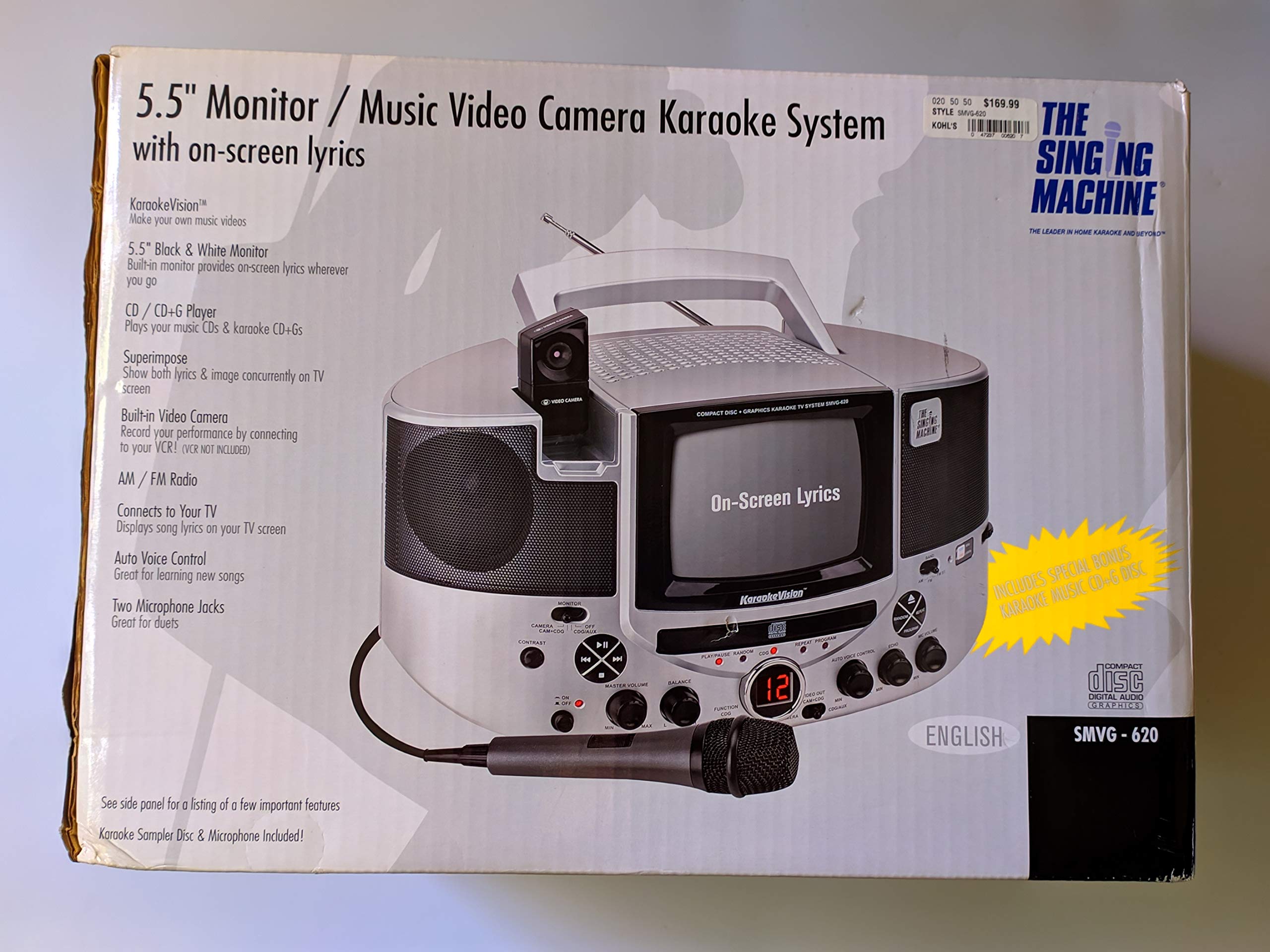
Umfanekiso 4.1: Ngemuva view of the product packaging highlighting key features and components of the SMVG-620 system.
Izici Eziyinhloko:
- 5.5" Black & White Monitor: For on-screen lyrics from CD+G discs.
- Built-in Color Camera: Allows you to see yourself on the monitor or connected TV.
- Dual Microphone Jacks: Connect two microphones for duets (one microphone included).
- Irediyo ye-AM/FM: Tune into your favorite radio stations.
- Isidlali se-CD+G: Plays standard audio CDs and CD+Graphics discs.
- I-Auto Voice Control (AVC): Helps maintain vocal balance by automatically reducing the main vocal track when you sing.
- Ukulawula i-Echo: Adds depth and resonance to your voice.
- Professional Style Microphone: For clear vocal pickup.
- Umsindo/Okukhipha ividiyo: Connects to your TV for larger screen display and enhanced audio.
5. Setha
5.1 Ukuxhuma Amandla
- Qinisekisa ukuthi iyunithi ibekwe endaweni ezinzile, eyisicaba.
- Connect the AC power adapter to the DC IN jack on the back of the SMVG-620 unit.
- Plug the other end of the AC power adapter into a standard wall outlet (AC 120V ~ 60Hz).
5.2 Ukuxhuma kumabonakude
Kuya view lyrics on a larger screen and enhance audio, connect the SMVG-620 to your television using the supplied Audio/Video RCA cables.
- Locate the AUDIO OUT (white and red) and VIDEO OUT (yellow) jacks on the back of the SMVG-620.
- Connect the white plug of the RCA cable to the white AUDIO OUT jack on the karaoke system and to the white AUDIO IN jack on your TV.
- Connect the red plug of the RCA cable to the red AUDIO OUT jack on the karaoke system and to the red AUDIO IN jack on your TV.
- Connect the yellow plug of the RCA cable to the yellow VIDEO OUT jack on the karaoke system and to the yellow VIDEO IN jack on your TV.
- Turn on your TV and select the correct A/V input source (e.g., AV1, Video 1) that corresponds to the jacks you used.
5.3 Ukuxhumana kwemakrofoni
Plug the microphone into either the MIC 1 or MIC 2 jack on the front of the SMVG-620 unit.
6. Ukusebenza
6.1 Ukuvula / Ukuvula
Cindezela inkinobho AMANDLA button located on the front panel to turn the unit ON or OFF.
6.2 CD+G Playback
- Open the CD compartment door and carefully place a CD+G disc (or standard audio CD) onto the spindle with the label side facing up. Close the door.
- Khetha I-CD+G mode using the FUNCTION selector.
- Cindezela inkinobho DLALA/YIMISA inkinobho ukuqala ukudlala.
- Lungisa i- UMQULU WE-MASTER cindezela izinga lokulalela olifisayo.
- Sebenzisa i- YEQA izinkinobho (<< or >>) ukuhamba phakathi kwamathrekhi.
- Ukumisa isikhashana, cindezela DLALA/YIMISA again. Press again to resume.
- Ukumisa ukudlala, cindezela inkinobho IMA inkinobho.
6.3 Ukusetshenziswa kwemakrofoni
- Ensure the microphone is connected to a MIC jack.
- Lungisa i- IMIC VOLUME knob to control the microphone's output level.
- Vula i- I-ECHO knob to add an echo effect to your voice.
- I AUTO VOICE CONTROL (AVC) switch can be toggled ON/OFF. When ON, the original vocal track on a CD+G disc will be reduced when you sing into the microphone.
6.4 AM/FM Umsakazo
- Khetha AM or FM mode using the FUNCTION selector.
- Nweba i-antenna ye-FM ukuze uthole ukwamukelwa okungcono.
- Vula i- UKULUNGISA inkinobho yokukhetha isiteshi somsakazo osithandayo.
- Lungisa i- UMQULU WE-MASTER ingquza.
6.5 Umsebenzi Wekhamera
The built-in camera allows you to display your image on the 5.5-inch monitor or a connected TV.
- Ensure the unit is powered on and connected to a TV if you wish to use an external display.
- The camera feed will automatically display when the unit is in CD+G or Video mode, or when no other video source is active.
7. Isondlo
7.1 Ukuhlanza Iyunithi
- Ngaso sonke isikhathi khipha iyunithi ku-outlet kagesi ngaphambi kokuhlanza.
- Sebenzisa indwangu ethambile, eyomile ukuhlanza ingaphandle.
- Ungasebenzisi izinto zokuhlanza abrasive, wax, noma izincibilikisi njengoba zingase zilimaze isiphetho.
- Ukuze uthole ilensi ye-CD, sebenzisa idiski ekhethekile yokuhlanza ilensi ye-CD.
7.2 Ukunakekelwa kwe-CD
- Bamba ama-CD ngonqenqema ukuze ugweme izigxivizo zeminwe endaweni yokudlala.
- Keep discs in their cases when not in use to prevent scratches.
- Hlanza amadiski ngendwangu ethambile, engenantambo, usule kusukela phakathi kuya ngaphandle.
8. Ukuxazulula izinkinga
If you encounter any issues with your SMVG-620, please refer to the following common problems and solutions.
| Inkinga | Imbangela Engenzeka | Isixazululo |
|---|---|---|
| Awekho amandla | Intambo yamandla ayixhumekile kahle. | Qinisekisa ukuthi i-adaptha ye-AC ixhunywe kahle kuyunithi kanye ne-outlet yodonga esebenzayo. |
| Awukho umsindo ovela kuzipikha | Master Volume is too low. Imodi yokusebenza engalungile ikhethiwe. | Khulisa i-MASTER VOLUME. Select the correct FUNCTION (CD+G, AM, FM). |
| Awukho umsindo ovela kumakrofoni | Imakrofoni ayixhunyiwe. MIC VOLUME is too low. Microphone switch is OFF. | Plug microphone into MIC 1 or MIC 2 jack. Increase the MIC VOLUME. Ensure microphone switch is ON. |
| No video on TV / No lyrics | RCA cables not connected correctly. Kukhethwe okokufaka kwe-TV okungalungile. Not a CD+G disc. | Check all RCA cable connections (yellow for video). Select the correct A/V input on your TV. Ensure you are playing a CD+G disc for lyrics. |
| CD skipping | Idiski lingcolile noma liklwebekile. Iyunithi isendaweni engazinzile. | Clean the disc or try another disc. Place the unit on a stable, vibration-free surface. |
9. Imininingwane
| Inombolo Yemodeli | SMVG-620 (SIN SMVG620) |
| Umthombo wamandla | AC 120V ~ 60Hz (via AC Adapter) |
| Gada | 5.5-inch Black & White |
| Ukubala kwesipikha | 2 |
| Amadivayisi Ahambisanayo | Umabonakude |
| Uhlobo Lwemidiya | CD, CD+G |
| Ubukhulu bomkhiqizo (LxWxH) | 35.8 x 20.8 x 19.3 cm (14.1 x 8.2 x 7.6 amayintshi) |
| Isisindo sento | 3.9 kg (8.6 lbs) |
10. Iwaranti kanye Nokusekela
For warranty information and customer support, please refer to the warranty card included with your product or contact The Singing Machine directly. You may also consult your retailer for details regarding their return and warranty policies.
Umkhiqizi: UMSHINI WOKUCULA